Wix Multilingual SEO: implementing hreflang correctly with Wix Multilingual
Module 20: Wix Studio & Velo Advanced SEO | Lesson 251 of 683 | 32 min read
By Michael Andrews, Wix SEO Expert UK
Multilingual SEO is one of the most technically demanding areas of search optimization, and getting it wrong can mean your translated pages compete with each other instead of targeting their intended audiences. Wix Multilingual automates much of the hreflang implementation, but it has gaps that can silently undermine your international SEO efforts. This lesson covers how the automation works, where it falls short, and how to fill those gaps with Velo and manual configuration.
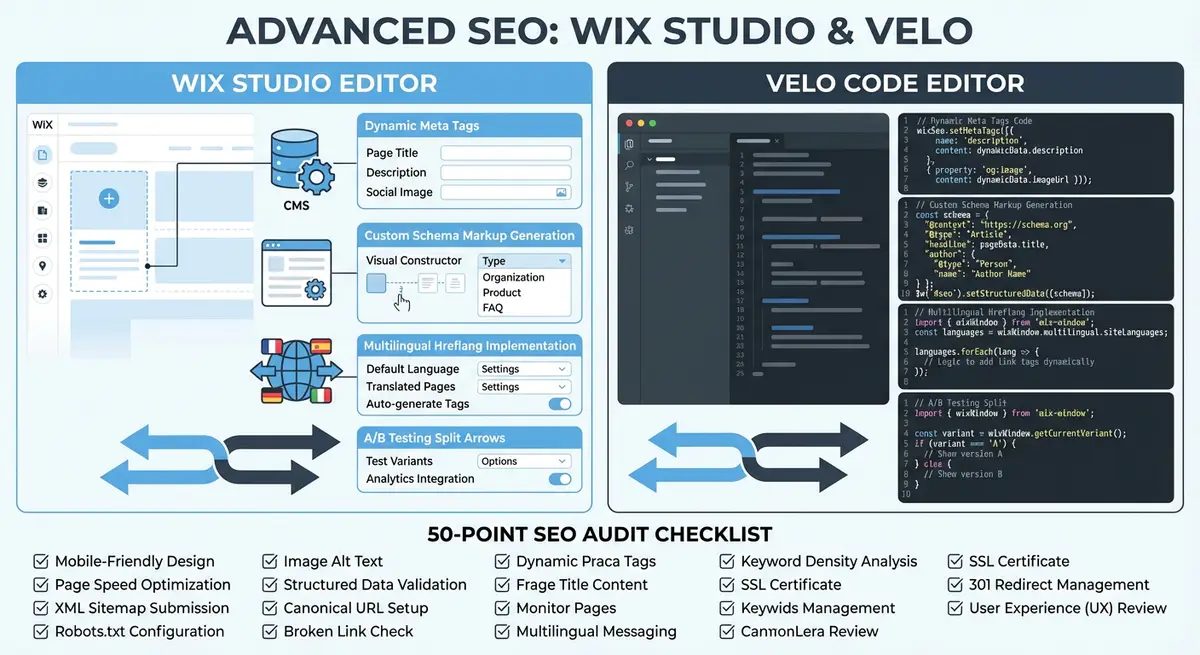
How Hreflang Works and Why It Matters
The hreflang attribute tells search engines which language and regional version of a page to show to users in specific locations. Without hreflang, Google may show your English page to French-speaking users in France even though you have a perfectly good French translation. Worse, Google might view your English and French versions as duplicate content and only index one of them, effectively wasting all your translation effort.
Hreflang is implemented through link elements in the page head, HTTP headers, or sitemap annotations. Each page must reference every other language version including itself, creating a bidirectional relationship. If your English page has an hreflang pointing to the French version, the French version must have an hreflang pointing back to the English version. Any asymmetry in these references causes Google to ignore the hreflang signals entirely.
<link rel="alternate" hreflang="en" href="https://www.example.com/products/widget" />
<link rel="alternate" hreflang="fr" href="https://www.example.com/fr/products/widget" />
<link rel="alternate" hreflang="de" href="https://www.example.com/de/products/widget" />
<link rel="alternate" hreflang="x-default" href="https://www.example.com/products/widget" />
What Wix Multilingual Handles Automatically
When you enable Wix Multilingual and add languages to your site, Wix automatically generates hreflang tags for all static pages. Each page version gets the correct language and region code in its hreflang, the bidirectional references are maintained automatically, and the x-default tag points to your primary language version. For simple brochure sites with a handful of languages, this automatic implementation is correct and complete.
Wix also handles URL structure automatically. Translated pages get a language prefix in their URL path: /fr/ for French, /de/ for German, /es/ for Spanish. The primary language typically has no prefix. This URL structure is clean, consistent, and follows Google recommended practices for multilingual URL organization. The sitemap is also updated automatically to include all language versions.
- Automatic hreflang link elements on all static pages with bidirectional references
- Language prefix URL structure (/fr/, /de/, /es/) applied consistently across the site
- x-default tag automatically set to the primary language version of each page
- Sitemap updated to include all translated page URLs across all enabled languages
- Language switcher component that uses proper anchor links to translated versions
- Automatic Content-Language HTTP header matching the displayed page language
Where Wix Multilingual Falls Short for SEO
The automatic hreflang implementation breaks down in several important scenarios. Dynamic pages powered by CMS collections may not have hreflang tags if the translated items are not properly connected in the Multilingual dashboard. If you add a new product to your English collection but the French translation is not yet created, the English page may still reference a French URL that returns a 404 or falls back to English, both of which are hreflang errors.
Regional variants within the same language are another gap. Wix Multilingual treats languages as simple codes (en, fr, de) but does not natively support regional variants like en-US versus en-GB or fr-FR versus fr-CA. If you serve different content to American English and British English audiences, you need to implement the regional hreflang tags manually through Velo because the Wix interface does not support this granularity.
Translating Meta Titles and Descriptions for Each Language
Translating page content is only half the job. Every translated page also needs a translated meta title and meta description that are optimized for search behavior in that language. Direct translation of your English SEO title will rarely produce the best title for the French or German version because keyword search patterns differ between languages. "Best running shoes" in English might be "chaussures de course" in French, but French users might actually search for "meilleures baskets pour courir" more frequently.
Conduct keyword research separately for each target language using tools that support those languages. Google Keyword Planner can be set to specific countries and languages. Write meta titles and descriptions that target the actual search terms used in each language, not literal translations of your English keywords. Store these translated SEO fields in your CMS alongside the translated content.
Multilingual meta tag optimization process
- Research primary keywords in each target language using Google Keyword Planner set to the target country
- Create language-specific SEO title formulas that incorporate local keyword patterns and character limits
- Write meta descriptions in each language that address the search intent of users in that market
- Add translated seoTitle and metaDescription fields to your CMS collection for each supported language
- Use Velo to dynamically set the meta tags based on the current language context
- Verify rendered meta tags by viewing page source on each language version after publishing
Language-Specific Structured Data
Structured data should match the language of the page it appears on. A Product schema on your French product page should have the product name and description in French, not English. Google uses structured data to generate rich results, and displaying English text in a French search result looks unprofessional and may be penalized. When using Velo to generate dynamic schema, pull the data from the translated version of the CMS item.
The inLanguage property should be set on Article, BlogPosting, and WebPage schema objects to explicitly declare the content language. While Google can detect language automatically, the explicit declaration removes any ambiguity. For Organization and LocalBusiness schemas, the language is less critical since business names and addresses are typically not translated, but descriptions and service areas should be localized.
import wixSeo from 'wix-seo';
import wixWindowFrontend from 'wix-window-frontend';

$w.onReady(async function () {
  const currentLang = wixWindowFrontend.multilingual.currentLanguage;
  const item = await getTranslatedItem(currentLang);

  const articleSchema = {
    '@context': 'https://schema.org',
    '@type': 'Article',
    'headline': item.title,
    'description': item.summary,
    'inLanguage': currentLang,
    'author': {
      '@type': 'Person',
      'name': item.authorName
    },
    'datePublished': item.publishDate,
    'dateModified': item.lastModified,
    'image': item.featuredImage,
    'publisher': {
      '@type': 'Organization',
      'name': 'YourBrand',
      'logo': {
        '@type': 'ImageObject',
        'url': 'https://www.yourbrand.com/logo.png'
      }
    }
  };

  wixSeo.structuredData = [articleSchema];
});
Geotargeting in Google Search Console
Google Search Console allows you to set a geographic target for your site or specific URL paths. For multilingual sites on a single domain (as Wix uses with language path prefixes), you cannot set different country targets per language prefix because GSC property targeting applies to the entire domain. This is a limitation of using subdirectory-based language targeting rather than country-code top-level domains (ccTLDs) like .fr or .de.
The hreflang implementation compensates for this limitation by signaling which pages target which audiences. If your hreflang is correctly implemented, Google will serve the French version to French users regardless of the GSC geographic target. However, for businesses that serve a specific country, setting the geographic target in GSC can provide an additional ranking signal for country-specific queries. If you primarily serve Australia, set the target to Australia even if your site has an English international version.
Common Multilingual SEO Mistakes on Wix
Mistake 1: Partially Translated Sites
Launching a translated version of your site with only half the pages translated is one of the most common and damaging multilingual SEO mistakes. Users who land on a translated homepage and then click through to untranslated product pages have a terrible experience. Google also struggles with sites that mix languages inconsistently. Either translate a complete section of your site (all products, all services) or do not launch that language version until the content is ready.
Mistake 2: Machine Translation Without Review
Using Google Translate or automated translation services without human review produces content that native speakers immediately recognize as machine-generated. This damages trust, increases bounce rates, and may be flagged by Google as low-quality auto-generated content. Always have a native speaker review and edit machine translations before publishing. The translation does not need to be perfect, but it must read naturally and accurately convey the original meaning.
Mistake 3: Identical Slugs Across Languages
Wix Multilingual uses the same slug across all language versions by default, with only the language prefix changing (/fr/products/widget instead of /fr/produits/gadget). While this is technically fine for hreflang, localized URL slugs can provide a marginal SEO benefit. If your French competitor ranks with /produits/gadget-bleu and your URL is /fr/products/blue-widget, the French URL has a slight relevance advantage. Consider manually setting translated slugs for your highest-value pages.
Mistake 4: Forgetting x-default
The x-default hreflang tag tells Google which page to show to users whose language does not match any of your available translations. Without x-default, Google has to guess which version to show to a user in Japan if you only have English and French versions. Wix Multilingual sets x-default automatically to your primary language, but verify this is present on all pages, especially dynamic pages where the automation may fail.
Multilingual SEO Tools
- Hreflang Tag Generator: Generate correct hreflang tag sets for your multilingual pages
- Hreflang Checker by Merkle: Validate hreflang implementation across your multilingual site
- Google Keyword Planner: Research keywords in specific languages and countries for localized SEO
- Wix Multilingual Documentation: Official setup guide for Wix Multilingual features
- SEO Fix in a Box: My Wix app. Free to install, it scans your site and shows what needs fixing, and paid plans write the fixes from your own Google searches
Complete How-To Guide: Implementing Multilingual SEO on Wix
This guide covers setting up Wix Multilingual with proper hreflang implementation, translating meta tags for each market, and avoiding the common mistakes that undermine international SEO efforts.
How to set up and optimise multilingual SEO on Wix
- Step 1: Enable Wix Multilingual from your dashboard under Settings. Add your target languages one at a time. Start with your highest-priority market language rather than adding all languages at once.
- Step 2: Before translating any content, conduct keyword research separately for each target language. Use Google Keyword Planner set to the target country and language. Document the actual search terms used by native speakers, as direct translations often miss the most popular query patterns.
- Step 3: Translate your highest-traffic pages first: homepage, top service or product pages, and contact page. Use professional translators or thoroughly reviewed machine translations. Never publish raw machine translations without native speaker review.
- Step 4: For each translated page, create language-specific SEO titles and meta descriptions. Do not simply translate your English meta tags. Write new titles and descriptions that target the keywords you discovered in Step 2 for that specific language and market.
- Step 5: After translating a complete section of your site, verify hreflang implementation. View the page source of a translated page and search for rel="alternate" hreflang tags. Confirm each page references all its language versions including itself and that x-default points to your primary language.
- Step 6: Use the Hreflang Checker tool by Merkle to validate your implementation across the entire site. Enter your domain and let it crawl all language versions. Fix any asymmetry errors where page A references page B but page B does not reference page A.
- Step 7: For CMS-driven dynamic pages, verify that translated items are properly connected in the Multilingual dashboard. If an English product exists but the French translation has not been created yet, ensure the English page does not generate a hreflang pointing to a non-existent French URL.
- Step 8: Add translated seoTitle and metaDescription fields to your CMS collections for each supported language. Use Velo to detect the current language with wixWindowFrontend.multilingual.currentLanguage and set the correct translated meta tags dynamically.
- Step 9: For structured data, ensure schema markup matches the page language. Pull descriptions and names from the translated CMS data. Add the inLanguage property to Article and WebPage schema objects with the current language code.
- Step 10: Consider localising URL slugs for your highest-value pages. While Wix uses the same slug across languages by default, you can manually set translated slugs like /fr/produits/chaussures-course instead of /fr/products/running-shoes for a marginal relevance advantage.
- Step 11: Set geographic targeting in Google Search Console if your site primarily serves one country. For generic TLDs serving specific markets, set the target to your primary country. The hreflang tags will still direct users to the correct language version.
- Step 12: Monitor performance per language in Google Search Console. Use the Search Appearance filter to view impressions, clicks, and average position for each language version. Track translation coverage monthly and prioritise completing sections where partially translated content is creating a poor user experience.
Was this lesson useful?
It takes 1 minute to tell me. The course is free and I want to keep it that way, and your feedback shows me what is working and helps other people find it.
This lesson on Wix Multilingual SEO: implementing hreflang correctly with Wix Multilingual is part of Module 20: Wix Studio & Velo Advanced SEO in The Most Comprehensive Complete Wix SEO Course in the World (2026 Edition). Created by Michael Andrews, a Wix Marketplace Legend Partner with 14 years of hands-on experience, 800 completed Wix SEO projects and 456 verified five-star reviews.