WCAG 2.2 compliance audit for Wix sites
Module 13: Accessibility & SEO on Wix | Lesson 156 of 683 | 35 min read
By Michael Andrews, Wix SEO Expert UK
WCAG 2.2 (Web Content Accessibility Guidelines) is the current standard for web accessibility. It is organised around four principles: Perceivable, Operable, Understandable and Robust (POUR). This lesson walks you through auditing your Wix site against the most SEO-relevant WCAG criteria using free tools.
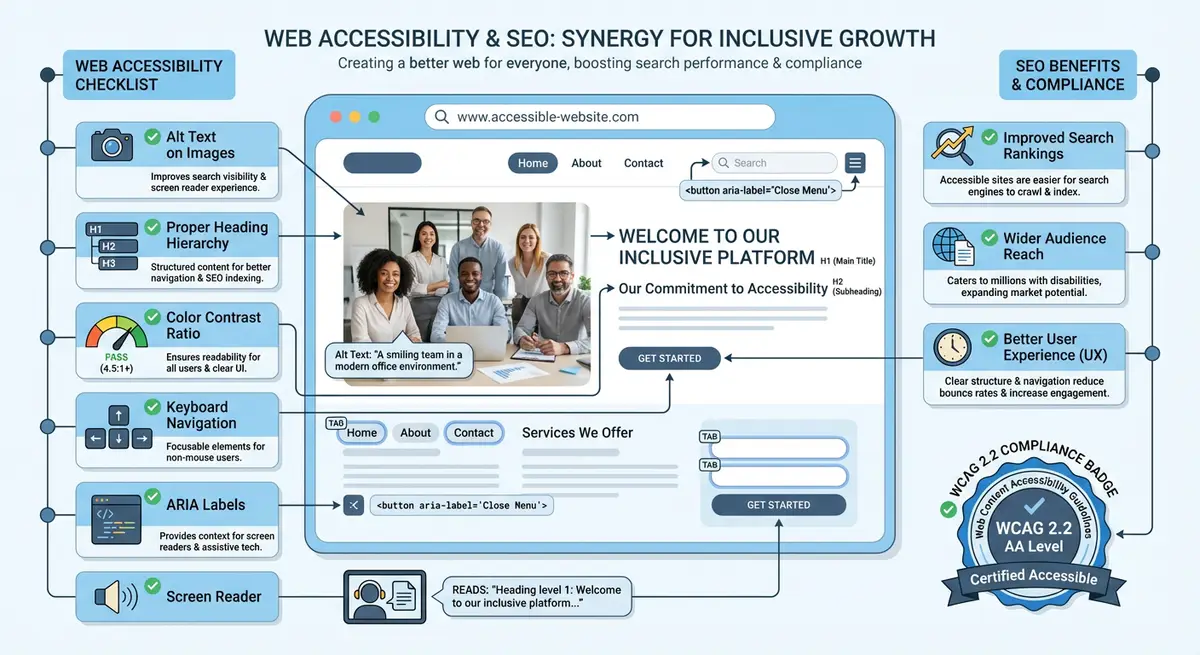
The Four WCAG Principles
- Perceivable: users must be able to perceive all content (alt text, captions, contrast)
- Operable: users must be able to operate the interface (keyboard navigation, touch targets, timing)
- Understandable: content must be understandable (clear language, predictable navigation, error messages)
- Robust: content must work across different browsers and assistive technologies (valid HTML, ARIA)
Running an Automated Audit
How to audit your Wix site with free tools
- Install the axe DevTools browser extension (free version)
- Navigate to your Wix homepage and run axe scan
- Review critical and serious issues first (these have the biggest SEO impact)
- Run the WAVE tool (wave.webaim.org) on the same page for a second opinion
- Use Lighthouse in Chrome DevTools: Performance tab includes accessibility scoring
- Repeat for your top 5 most important pages
Most Common Wix Accessibility Violations
- Missing alt text on images (most common, direct SEO impact)
- Insufficient colour contrast between text and background
- Missing form labels on contact forms and search bars
- Heading levels skipped (e.g., H1 to H3 with no H2)
- Links with non-descriptive text like "Click here" or "Read more"
- Missing language attribute on the HTML element
Prioritising Fixes by SEO Impact
Not all accessibility issues are equal from an SEO perspective. Prioritise fixes in this order: (1) missing alt text, (2) heading hierarchy issues, (3) colour contrast failures, (4) missing form labels, (5) link text improvements. These five categories cover the accessibility issues that have the most direct impact on search engine rankings and user engagement.
Complete How-To Guide
This step-by-step guide walks you through performing a full WCAG 2.2 compliance audit on your Wix site, from initial automated scans through manual testing to documentation and remediation planning.
How to perform a complete WCAG 2.2 audit on your Wix site
- Step 1: Create an audit document (spreadsheet or document) with columns for Page URL, WCAG Criterion (e.g. 1.1.1 Non-text Content), Severity (Critical/Serious/Moderate/Minor), Description, Element Location, and Remediation Status. This will be your master tracking document.
- Step 2: List every unique page template on your Wix site. Most Wix sites have 5-10 distinct templates (homepage, service page, blog post, contact page, etc.). You will audit one representative page from each template rather than every single page.
- Step 3: Install both axe DevTools and the WAVE browser extension in Chrome. Open the first page on your list, run axe DevTools, and export the results. Then run WAVE on the same page. Record every unique issue from both tools in your audit document.
- Step 4: For each page, check Perceivable criteria manually. Right-click each image and verify it has meaningful alt text. Check that all videos have captions or transcripts. Verify that no information is conveyed by colour alone (e.g. red text for errors without an icon or label).
- Step 5: Check Operable criteria by putting your mouse away and navigating the entire page using only Tab, Shift+Tab, Enter, and Arrow keys. Verify that every interactive element (links, buttons, form fields, menus) can be reached and activated. Time any auto-advancing carousels or slideshows and ensure they can be paused.
- Step 6: Check Understandable criteria by reviewing all form fields for visible labels, all error messages for clarity, and all navigation menus for consistency across pages. Verify that the page language is set correctly in Wix Site Settings under SEO > Advanced.
- Step 7: Check Robust criteria by validating the page HTML. Use the W3C HTML Validator (validator.w3.org) on your published Wix URL. While Wix generates most HTML automatically, custom embeds and third-party widgets often introduce validation errors.
- Step 8: Test with a real screen reader. On Windows, download NVDA (free) and navigate your homepage with it. On Mac, enable VoiceOver with Cmd+F5. Listen to how the screen reader announces your page content, headings, images and navigation. Note any confusing or missing announcements.
- Step 9: Test WCAG 2.2 specific criteria that are new in this version: check that all interactive targets (buttons, links) are at least 24x24 CSS pixels (Success Criterion 2.5.8 Target Size Minimum). In the Wix editor, check the dimensions of all buttons and clickable elements.
- Step 10: Test focus appearance (WCAG 2.2 criterion 2.4.11). Tab through your site and verify that the focus indicator on each element is clearly visible, has a minimum 2px outline, and has sufficient contrast against the background. Wix default focus styles may need enhancement via custom CSS.
- Step 11: Categorise all findings by priority. Critical issues are those that completely block access for some users (e.g. no keyboard access to main navigation). Serious issues significantly impair access (e.g. missing form labels). Moderate issues cause difficulty (e.g. low contrast on secondary text). Minor issues are best-practice improvements.
Essential Resources
- WAVE Web Accessibility Evaluator: Free tool to check web accessibility compliance for any URL
- axe DevTools: Browser extension for automated accessibility testing
- WebAIM Contrast Checker: Check colour contrast ratios meet WCAG requirements
- WCAG 2.2 Guidelines: Official Web Content Accessibility Guidelines specification
Completing the audit remediation and scheduling ongoing reviews
- Step 12: For each issue, write a specific remediation step. Instead of "fix alt text," write "Add alt text to the hero image on the Services page describing the team meeting photograph." Specific instructions make fixes faster and less error-prone.
- Step 13: Implement fixes in priority order directly in the Wix Editor. After fixing each batch of issues on a page, re-run axe DevTools to confirm the fixes resolved the flagged violations. Update your audit document status column for each resolved issue.
- Step 14: After all fixes are implemented, perform a complete re-audit of every page template to verify no new issues were introduced during remediation. Generate a final audit report summarising the total issues found, issues resolved, and any remaining known limitations.
- Step 15: Schedule your next audit. WCAG compliance is not a one-time activity. Set a quarterly full audit and monthly spot-checks on new or recently updated pages. Add audit dates to your content calendar alongside your SEO review schedule.
Essential Resources
- axe DevTools: Automated WCAG 2.2 compliance testing in your browser
- WAVE Web Accessibility Tool: Visual overlay of accessibility issues on any web page
- W3C WCAG 2.2 Guidelines: Official W3C specification for Web Content Accessibility Guidelines 2.2
- WebAIM Contrast Checker: Test any colour combination against WCAG contrast requirements
Was this lesson useful?
It takes 1 minute to tell me. The course is free and I want to keep it that way, and your feedback shows me what is working and helps other people find it.
This lesson on WCAG 2.2 compliance audit for Wix sites is part of Module 13: Accessibility & SEO on Wix in The Most Comprehensive Complete Wix SEO Course in the World (2026 Edition). Created by Michael Andrews, a Wix Marketplace Legend Partner with 14 years of hands-on experience, 800 completed Wix SEO projects and 456 verified five-star reviews.