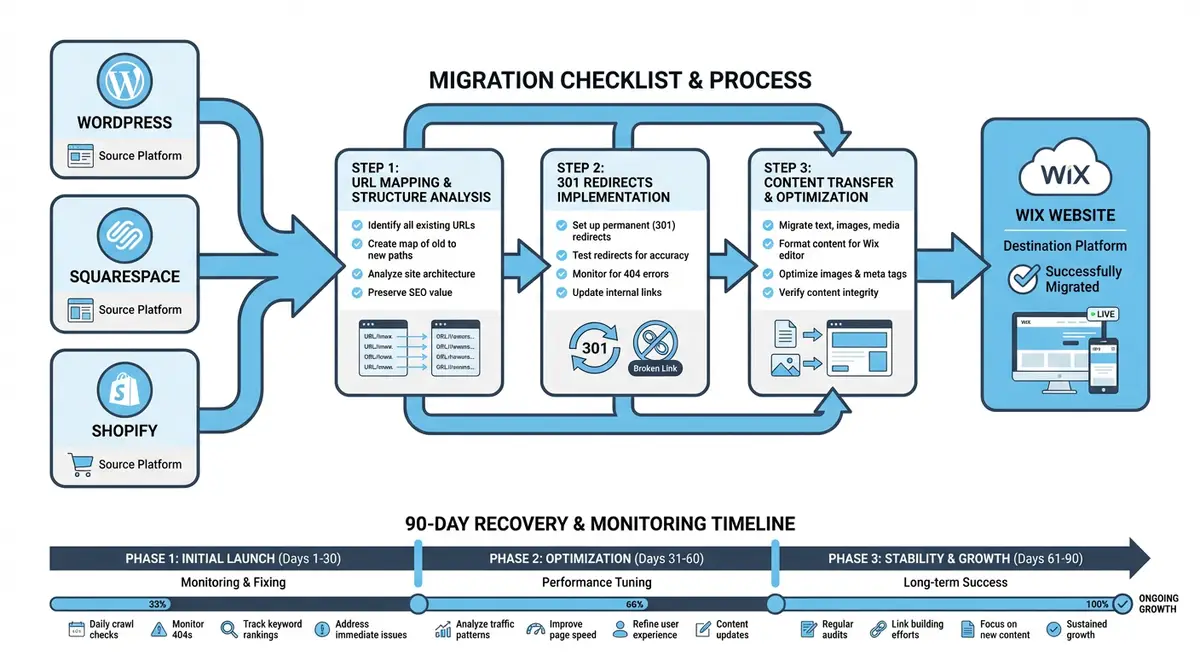
Universal migration checklist covering URL mapping 301 redirects and post-migration monitoring
Module 48·Lesson 4 of 5·50 min read

The universal migration checklist: URL mapping, 301 redirects and monitoring

Regardless of which platform you are migrating from, the core SEO migration process is the same. This lesson provides the universal migration checklist that applies to any move to Wix.

What you will learn in this Wix SEO lesson

  • The complete pre-migration SEO documentation process
  • Building a comprehensive URL redirect map
  • Testing redirects before and after DNS switchover
  • Resubmitting sitemaps and monitoring indexing in Search Console
  • The 30-60-90 day post-migration monitoring framework

Whether you are migrating from WordPress, Squarespace, Shopify, Joomla, Drupal, Weebly, GoDaddy, or any custom-built platform to Wix, the fundamental SEO migration principles are identical. This lesson provides a platform-agnostic migration framework that applies to every migration scenario regardless of origin platform. It distils the collective lessons from hundreds of real migrations into a structured, repeatable process. Every single step exists because we have personally witnessed migrations fail when it was skipped. Use this as your master checklist and never deviate from it.

How-to infographic showing website migration to Wix from WordPress, Squarespace, and Shopify including URL mapping, 301 redirects, content transfer, and 90-day post-migration recovery monitoring
A carefully planned migration preserves your existing rankings and traffic when moving to Wix from any other platform.

The Migration Success Formula

Successful migrations follow a consistent formula: exhaustive preparation, meticulous execution, and disciplined monitoring. The ratio of time spent should be approximately 40% preparation, 20% execution, and 40% monitoring. Most failed migrations invest the ratio backwards: minimal preparation, rushed execution, and panicked monitoring. The preparation phase is where migration success is determined.

The One Rule That Overrides Everything

Never migrate and redesign simultaneously. The single most important rule in SEO migration is: change one variable at a time. Migrate the platform first with identical content, structure, and design. Wait 90 days. Only then make content changes, design updates, or structural improvements. Combining migration with redesign makes it impossible to diagnose whether ranking changes are caused by the platform switch or the content and design changes.

Phase 1: Pre-Migration Documentation (1-2 Weeks)

The pre-migration phase creates a forensic snapshot of your current SEO state. This documentation serves three purposes: it is your benchmark for measuring migration success, your diagnostic tool if something goes wrong, and your evidence base for reporting to stakeholders. Every metric you fail to document before migration is a metric you cannot compare after migration.

Search Performance Data Export

Complete Search Console data export

  1. 1Export 16 months of Google Search Console data (not 12 months; the extra 4 months gives year-over-year comparison capability)
  2. 2Export the Queries report: every search term with clicks, impressions, CTR, and average position
  3. 3Export the Pages report: every URL with clicks, impressions, CTR, and average position
  4. 4Export the External Links report: pages with the most inbound links from external websites
  5. 5Export the Internal Links report: current internal linking structure and distribution
  6. 6Screenshot the Pages indexing report showing total indexed versus excluded pages
  7. 7Screenshot Core Web Vitals scores for both mobile and desktop
  8. 8Document the current sitemap status: submitted sitemaps, their URLs, and processing status
  9. 9Check and screenshot Manual Actions and Security Issues tabs (should be clean)

Analytics and Conversion Data

GA4 baseline data extraction

  1. 1Export 12 months of organic traffic data broken down by landing page
  2. 2Export conversion data filtered to organic traffic: leads, sales, signups, or whatever your conversion goals are
  3. 3Export the top 100 organic landing pages with sessions, engaged sessions, bounce rate, and average engagement time
  4. 4For eCommerce sites: export organic revenue by landing page, conversion rate, and average order value
  5. 5Create a week-by-week organic traffic trend for the past 12 months for pattern analysis
  6. 6Note any seasonal patterns, spikes, or dips that could confuse post-migration analysis

Technical SEO Crawl

A comprehensive site crawl is your definitive source of truth for what currently exists on the old platform. Configure your crawler to capture every possible data point because you will reference this data repeatedly during and after migration.

Site crawl configuration and execution

  1. 1Use Screaming Frog or Sitebulb configured to follow redirects and render JavaScript
  2. 2Capture: URL, HTTP status code, title tag, meta description, H1 tag, H2 tags, canonical URL, word count, internal links in, internal links out, response time, indexability status
  3. 3Export the complete crawl dataset as CSV
  4. 4Separately export: the redirect report (all active 301s and 302s), the response codes report, and the structured data report
  5. 5Count total indexable pages versus non-indexable pages
  6. 6Identify and document any existing redirect chains or redirect loops
  7. 7Note any pages blocked by robots.txt that may still have backlinks

Backlink Profile Audit

Your backlink profile is the accumulated authority from years of link building, press coverage, directory listings, and content marketing. Every backlink points to a specific URL. If that URL changes during migration without a redirect, the backlink equity evaporates.

Complete backlink documentation

  1. 1Export full backlink profiles from at least two tools (Ahrefs and Semrush recommended) for completeness
  2. 2Create a deduplicated list of every URL on your site that receives at least one external backlink
  3. 3Sort by referring domains (most linked pages are highest priority for redirect accuracy)
  4. 4Cross-reference with your crawl data: every backlinked URL MUST exist in your redirect map
  5. 5Identify backlinks to non-page resources: PDFs, images, downloadable files
  6. 6Note any high-authority backlinks (DA 60+) that are particularly valuable to preserve
  7. 7Document the total number of referring domains as your pre-migration authority benchmark

Structured Data and Rich Results Inventory

Structured data documentation

  1. 1Test your top 20 pages with Google Rich Results Test and document all schema types found
  2. 2Common types to check: Organization, LocalBusiness, Article, BlogPosting, Product, FAQ, HowTo, BreadcrumbList, WebPage, WebSite
  3. 3For each schema type, document which fields are populated and what data they contain
  4. 4Screenshot any rich results currently appearing in Google for your pages (star ratings, FAQ dropdowns, breadcrumbs, etc.)
  5. 5Note which schema was generated by plugins versus manually coded versus platform-native

Store Everything Securely

Store all pre-migration exports in a dedicated cloud folder that multiple team members can access. Label each file with the date and data type. This data becomes irreplaceable once the old site is taken down. Treat your pre-migration documentation as mission-critical business records.

Phase 2: Building the Master URL Redirect Map (3-5 Days)

The URL redirect map is the single most critical document in any migration. It is a complete, verified mapping of every old URL to its new Wix equivalent. The quality of this map directly determines the percentage of SEO equity preserved during migration.

URL Categorisation Framework

Every URL from your crawl and backlink audit must be categorised into one of four groups. This categorisation determines how each URL is handled during migration.

  • Category A - Migrate and Redirect (1:1): pages being recreated on Wix with a direct equivalent. The old URL redirects to the new Wix URL for the same page. This is the ideal scenario for every important page.
  • Category B - Consolidate and Redirect (Many:1): multiple old pages being merged into a single Wix page. All old URLs redirect to the consolidated destination. Common for thin content pages being combined into comprehensive resources.
  • Category C - Retire and Redirect (1:nearest): pages being permanently removed with no Wix equivalent. Redirect to the most topically relevant alternative page. Never redirect to the homepage unless there is genuinely no better option.
  • Category D - Ignore (no action): system URLs with no SEO value (admin pages, login pages, API endpoints). These generate expected 404s that do not affect rankings.

Building the Redirect Map Spreadsheet

Redirect Map Template (CSV columns):

old_url           | new_url          | type | priority | category | backlinks | traffic | notes
─────────────────────────────────────────────────────────────────────────────────────────────
/about-us/        | /about           | 301  | high     | A        | 12        | 450/mo  | Top backlinked page
/services/seo/    | /services/seo    | 301  | high     | A        | 8         | 320/mo  | Core service page
/blog/seo-tips/   | /post/seo-tips   | 301  | medium   | A        | 3         | 180/mo  | Popular blog post
/old-service/     | /services        | 301  | low      | C        | 1         | 15/mo   | Service discontinued
/team/member1/    | /about           | 301  | low      | B        | 0         | 8/mo    | Consolidated into about
/wp-login.php     | --               | --   | none     | D        | 0         | 0       | System URL, ignore

Required columns:
- old_url: the full path from the old platform (without domain)
- new_url: the full path on Wix (without domain)
- type: always 301 for SEO preservation
- priority: high/medium/low based on backlinks and traffic
- category: A (migrate), B (consolidate), C (retire), D (ignore)
- backlinks: number of external backlinks pointing to this URL
- traffic: monthly organic sessions from GSC data
- notes: any special handling instructions

Redirect Map Quality Assurance

Verifying your redirect map before implementation

  1. 1Cross-reference the total URL count in your redirect map against your crawl data total indexed pages
  2. 2Verify every URL with backlinks (from your backlink audit) appears in the redirect map
  3. 3Verify every URL with organic traffic (from GSC data) appears in the redirect map
  4. 4Check for duplicate entries (same old URL appearing twice with different destinations)
  5. 5Verify that no redirect destination is itself a URL being redirected (this creates chains)
  6. 6Have a second person independently review the top 50 highest-priority redirects
  7. 7Test the redirect map logic in a spreadsheet: are there any URLs that should be Category A but were marked as C?

Phase 3: Redirect Implementation and Testing (2-3 Days)

Importing Redirects into Wix

Wix URL Redirect Manager implementation

  1. 1Navigate to Wix Dashboard > Marketing & SEO > SEO Tools > URL Redirect Manager
  2. 2Prepare your CSV with two columns: old URL path and new URL path (no domain, no redirect type column)
  3. 3Click "Import from file" and upload the CSV
  4. 4After import, verify the total redirect count matches your map
  5. 5For trailing slash variations: add separate redirect entries for /path/ and /path if both may be accessed
  6. 6For query parameter URLs: add redirects for the most common parameter patterns

Systematic Redirect Testing

Pre-launch redirect verification protocol

  1. 1Use httpstatus.io or a similar bulk checker to test every redirect simultaneously
  2. 2Verify each redirect returns HTTP 301 (not 302, not 307, not a redirect chain)
  3. 3Check for redirect loops where URL A → B → A
  4. 4Check for redirect chains where URL A → B → C (flatten to A → C)
  5. 5Test redirects with and without trailing slashes
  6. 6Test redirects with query parameters (?utm_source=... etc.)
  7. 7Test from both desktop and mobile browsers
  8. 8Have a second person independently test the top 50 highest-priority redirects manually

Redirect Chains Dilute SEO Value

Every hop in a redirect chain loses a small amount of link equity (estimated 5-15% per hop). If your old platform already had redirects from a previous migration, your new redirects must point from the ORIGINAL source URL to the FINAL Wix destination. Flatten all multi-hop chains into single-hop redirects. Three-hop chains can lose 30-40% of link equity.

Phase 4: Content Parity Verification (1-2 Days)

Before going live, verify that every important page on Wix contains identical SEO elements to its old-platform counterpart. Content parity means: same title tag, same meta description, same H1, same heading structure, same body content, same internal links (updated to Wix URLs), same images with same alt text.

Content parity spot-check protocol

  1. 1Select your top 30 pages by organic traffic
  2. 2For each page, compare the old and new versions side-by-side
  3. 3Verify title tag matches character-for-character
  4. 4Verify meta description matches character-for-character
  5. 5Verify H1 tag matches
  6. 6Verify heading hierarchy (H2s, H3s) matches in structure and text
  7. 7Verify body content is complete (no paragraphs lost during migration)
  8. 8Verify all images are present, loading correctly, and have preserved alt text
  9. 9Verify internal links point to Wix URLs (not old platform URLs)
  10. 10Verify structured data is present and valid (use Rich Results Test)

Phase 5: The Domain Switch (1 Day)

Domain switch execution checklist

  1. 1Schedule the switch during a low-traffic period (early morning, weekday)
  2. 2Take final screenshots of all key metrics immediately before the switch
  3. 3Update DNS records to point to Wix (nameservers or A records depending on registrar)
  4. 4Monitor DNS propagation using whatsmydns.net
  5. 5Keep the old platform running during propagation (24-48 hours) as a safety net
  6. 6Once propagation is confirmed, verify the Wix site loads correctly on your domain
  7. 7Test SSL certificate: ensure HTTPS is active and there are no mixed content warnings
  8. 8Verify robots.txt is accessible and not blocking important pages
  9. 9Confirm your Wix sitemap is accessible at yourdomain.com/sitemap.xml

Phase 6: Immediate Post-Launch Actions (Day 1)

Critical first-day actions

  1. 1Submit your Wix sitemap to Google Search Console within 1 hour of confirmed propagation
  2. 2Use URL Inspection tool to request indexing of your 10 most important pages
  3. 3If changing domains: use the Change of Address tool in Google Search Console
  4. 4Verify Google Analytics tracking is firing correctly on every page
  5. 5Test all contact forms and verify notifications are being received
  6. 6Test eCommerce checkout if applicable (place a real test order)
  7. 7Run a quick crawl of the new site to check for unexpected 404s or errors
  8. 8Set up Uptime Robot or similar monitoring to alert you if the site goes down

Phase 7: The 30-60-90 Day Monitoring Framework

Days 1-7: Critical Phase

  • Check Google Search Console daily for crawl errors and 404 pages. Fix any within 24 hours.
  • Test 20 random redirects daily from your redirect map.
  • Monitor real-time traffic in GA4 to confirm organic sessions are flowing.
  • Review the Index Coverage report for trends in indexed page count.
  • Compare daily organic sessions to the same day in the previous year.

Days 7-30: Stabilisation Phase

  • Track keyword positions for your top 50 keywords using a rank tracking tool.
  • Flag any keyword dropping more than 15 positions that does not recover within 7 days.
  • Compare weekly organic traffic to the same week in the previous year.
  • Check for redirect chains or loops that may have formed.
  • Verify Core Web Vitals scores meet "Good" thresholds in Search Console.
  • Review structured data validity for your top pages in Rich Results Test.

Days 30-60: Recovery Assessment

  • Generate a formal 30-day migration report comparing all key metrics to baseline.
  • Investigate keywords still down more than 10 positions: check content parity, redirect accuracy, and competitor activity.
  • Organic traffic should be within 10-20% of baseline at 30 days. Larger gaps require investigation.
  • At 45 days, most rankings should be stabilising. Persistent drops indicate specific issues.

Days 60-90: Final Benchmark

  • Generate a comprehensive 60-day report. Traffic should be within 10-15% of baseline.
  • At 90 days, generate the final migration success report.
  • Success criteria: organic traffic within 10% of baseline, 90%+ of keywords within 5 positions of baseline, no significant crawl errors, all redirects functioning.
  • After the 90-day benchmark, transition to monthly maintenance monitoring.
  • Only after confirming 90-day success should you begin content improvements or site changes.

Emergency Response Protocol: Diagnosing Traffic Drops

Traffic drop diagnostic workflow

  1. 1Check Google Search Console for manual actions or security issues coinciding with the migration
  2. 2Verify robots.txt is not blocking Googlebot from critical pages
  3. 3Confirm no pages have accidentally been set to noindex in Wix SEO settings
  4. 4Audit your top 20 pages for content parity: identical title tags, meta descriptions, H1s, and content
  5. 5Run a redirect audit: are all high-priority redirects still returning 301 status codes?
  6. 6Check for redirect chains or loops that may have developed
  7. 7Compare Core Web Vitals before and after migration for performance regressions
  8. 8Check if Google is crawling the old URLs or the new URLs (URL Inspection tool)
  9. 9Verify XML sitemap is correctly listing all new URLs and being processed by Google
  10. 10If traffic drop exceeds 40% after 30 days, engage an SEO specialist for a full migration audit

Normal vs Abnormal Fluctuation

A 10-20% traffic variance in the first 30 days is normal during any platform migration. Google is recrawling, re-evaluating, and reindexing your content. A drop exceeding 30% after 14 days or 20% after 30 days signals a problem that needs investigation. Do not panic at minor fluctuations, but do not ignore sustained significant drops.

Preparing DNS for Minimal Downtime

DNS configuration before migration is a frequently overlooked technical step that can mean the difference between minutes of downtime and days of inconsistent access. Proper DNS preparation ensures the domain switch happens as quickly as possible across all geographic regions.

DNS preparation checklist

  1. 1One week before migration: lower your DNS TTL (Time to Live) from the default (often 86400 seconds / 24 hours) to 300 seconds (5 minutes). This tells DNS resolvers to check for updates more frequently.
  2. 2Document your current DNS records completely: A records, CNAME records, MX records (email), TXT records (SPF, DKIM, domain verification), and any other records
  3. 3Identify which DNS records need to change (A/CNAME for website) and which must stay the same (MX for email, TXT for verification)
  4. 4If using third-party email (Google Workspace, Microsoft 365), verify MX records will not be disrupted by the DNS change
  5. 5Prepare the new DNS values from Wix: either the Wix nameservers or the A record / CNAME record pointing to Wix
  6. 6Schedule the DNS change for a low-traffic period and have the new values ready to paste immediately
  7. 7After the switch: monitor propagation using whatsmydns.net. With a 300-second TTL, most regions should update within 1-2 hours.
  8. 8After migration is confirmed stable (7-14 days): increase TTL back to a longer value (3600 or 86400) for caching efficiency

Email Disruption Risk

The number one non-SEO migration failure is accidentally breaking email delivery during the DNS switch. If you change nameservers (rather than individual A records), ALL DNS records transfer to the new provider. Ensure your email MX records, SPF, and DKIM records are replicated at the new DNS provider BEFORE making the switch. Test email delivery immediately after the DNS change.

CDN and Caching Considerations During Migration

If your old site uses a CDN like Cloudflare, Sucuri, or a hosting-provider CDN, the caching layer adds complexity to migration. Cached versions of your old site may continue serving content even after DNS points to Wix, and Cloudflare proxy settings can interfere with the Wix SSL certificate.

  • If using Cloudflare: disable the proxy (orange cloud) for your domain records before pointing to Wix. Wix requires direct DNS resolution for SSL to work correctly.
  • Purge all CDN caches on the old provider immediately after the DNS switch to prevent stale content being served
  • If the old site used aggressive browser caching headers, returning visitors may see cached versions of the old site. This resolves itself as caches expire but can cause confusion in the first 24-48 hours.
  • Wix provides its own CDN automatically. Do not layer an external CDN on top of Wix as it can cause SSL conflicts and performance issues.
  • If using Cloudflare for security features (WAF, DDoS protection), note that Wix includes its own security infrastructure. You generally do not need Cloudflare in front of Wix.
  • Test the live Wix site from multiple locations using a VPN or tools like GeoPeeker to verify the new site is serving correctly across regions

Hreflang Migration for International Sites

International sites with multiple language or country versions must migrate their hreflang tag infrastructure alongside the content. Hreflang tells Google which version of a page to show users in different languages or countries. Breaking hreflang during migration can cause Google to show the wrong language version to users, dramatically reducing click-through rates in international markets.

Hreflang migration process

  1. 1Document all hreflang tags on the old site: which pages link to which alternate language versions
  2. 2Map old alternate URLs to new Wix URLs for every language version
  3. 3On Wix, implement hreflang tags using Wix Multilingual (which handles this automatically) or via custom code in Advanced SEO settings
  4. 4Verify bidirectional hreflang: if page A links to page B as the French version, page B must link back to page A as the English version
  5. 5Include x-default hreflang for the default version (usually English or the primary language)
  6. 6Submit separate sitemaps for each language version to Google Search Console
  7. 7After migration, run the hreflang audit in Screaming Frog or Ahrefs to verify all tags are correct and bidirectional
  8. 8Monitor international traffic by country in GA4 to detect any sudden drops in specific markets

Content Management Workflow Post-Migration

After the technical migration is complete, your team needs to adapt to the new content management workflow on Wix. Staff who were trained on the old platform will need onboarding on the Wix Editor. Without this transition planning, content updates stall and the site becomes stale during the critical recovery period.

  • Create a Wix Editor training guide for content team members covering: adding and editing pages, managing blog posts, updating images, editing SEO settings, and managing forms
  • Document the SEO checklist for new content: every new page or blog post must have a custom title tag, meta description, H1, alt text on images, and proper internal links
  • Set up editorial roles in Wix: assign appropriate permissions so content editors can publish without accidentally changing site structure or design
  • Establish a content review workflow: new content should be reviewed for SEO compliance before publishing during the recovery period
  • Create a template for new blog posts that includes all required SEO fields pre-formatted
  • Document the process for adding new URL redirects in case old URLs are discovered that were missed during migration
  • Schedule weekly content team meetings during the first month to address questions and workflow issues on the new platform

Finished this lesson?

Mark it complete to track your course progress.

AI Lesson Tutor

AI Powered

Got a question about this lesson? Ask the AI tutor for a quick explanation or practical examples.

Your Course Resources

11 downloadable PDFs -- checklists, templates, worksheets and your certificate

Course Progress0/561 lessons

Checklists

Wix SEO Audit ChecklistPDF

20-point site-wide audit covering technical, on-page, content and local SEO

On-Page SEO ChecklistPDF

37-point per-page checklist: titles, headings, content, images, links, schema

Technical SEO Deep-DivePDF

50-point technical audit: crawlability, Core Web Vitals, speed, security, Wix-specific

Local SEO Setup ChecklistPDF

42-point local checklist: Google Business Profile, NAP, citations, reviews, local links

Site Launch SEO ChecklistPDF

48-point pre-launch and post-launch guide for new Wix sites going live

Templates & Worksheets

Keyword Research TemplatePDF

Printable tracker with columns for volume, difficulty, intent, priority and notes

Monthly SEO Report TemplatePDF

Client-ready report covering traffic, rankings, technical health and action plan

Content Brief TemplatePDF

Plan every page: target keywords, outline, competitor analysis, internal links, CTAs

Backlink Outreach TrackerPDF

Campaign log with status tracking plus 3 proven outreach email templates

Competitor Analysis WorksheetPDF

14-metric comparison table, content gap analysis and SEO SWOT framework

Achievement

Certificate of CompletionLocked

Complete all lessons to unlock (0/561 done)

Lesson Tools

No part of this Wix SEO Course content may be reproduced, copied, or distributed without the written consent of Michael Andrews.

This lesson on The universal migration checklist: URL mapping, 301 redirects and monitoring is part of Module 48: Migrating to Wix Without Losing Rankings in The Most Comprehensive Complete Wix SEO Course in the World (2026 Edition). It covers Wix SEO optimization (US) and optimisation (UK) strategies applicable to businesses in the United Kingdom, United States, Australia, Canada, New Zealand, Ireland and worldwide. Created by Michael Andrews, the UK's No.1 Wix SEO Expert with 14 years of hands-on experience, 750+ completed Wix SEO projects and 425+ verified five-star reviews. This is lesson 519 of 561 in the most affordable, most comprehensive Wix SEO training programme available in 2026.