Post-migration SEO recovery: what to check daily for 90 days
Module 48: Migrating to Wix Without Losing Rankings | Lesson 540 of 683 | 25 min read
By Michael Andrews, Wix SEO Expert UK
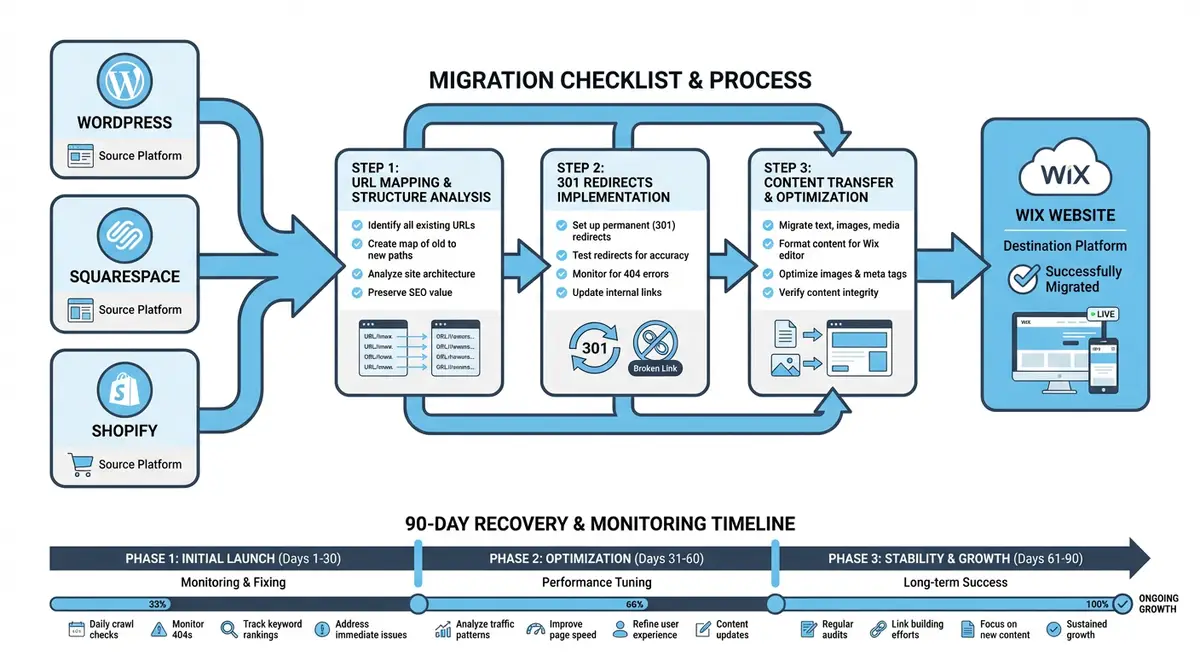
The migration is live. Your Wix site is serving traffic on your production domain. The redirects are in place. Now begins the most anxious phase of any migration: the 90-day recovery period. This is when Google recrawls your entire site, processes your redirects, reindexes your content on the new platform, and re-evaluates your rankings. What you monitor and how quickly you respond to issues during these 90 days determines whether your migration is a success or a ranking disaster.
Days 1-7: Critical Checks
The first week after migration is the highest-risk period. This is when the majority of technical issues surface: broken redirects, missing pages, blocked resources, and indexing errors. You should be checking Google Search Console, your live site, and your redirect functionality at least once per day during this period. Set up automated monitoring alerts so you are notified immediately if something breaks.
Daily checks for the first week
- Check Google Search Console for new crawl errors and 404 pages: fix any within 24 hours
- Review the URL Inspection tool for your top 10 pages to verify they are being crawled and indexed
- Test 10 random redirects from your redirect map to confirm they are functioning correctly
- Monitor real-time traffic in GA4 to ensure organic visitors are arriving and pages are loading
- Check your Wix site on mobile and desktop for any rendering issues or broken functionality
- Verify that your XML sitemap is accessible and has been processed in Google Search Console
- Review server response times to ensure no performance degradation on the new platform
Week 2-4: Monitoring and Stabilisation
By the second week, the initial crawling frenzy slows down and Google begins reprocessing your rankings. You will likely see ranking fluctuations during this period as Google re-evaluates your content on the new platform. Some keywords may temporarily drop while others may improve. This volatility is normal and does not indicate a problem unless specific high-value keywords drop more than 15 positions and stay there for more than a week.
- Compare weekly organic traffic to the same week in the previous year, not to the previous week
- Track ranking positions for your top 30 keywords using a rank tracking tool with daily monitoring
- Review the Index Coverage report in GSC weekly: "Valid" pages should be increasing as new URLs are indexed
- Check for any new redirect chains that may have formed: old URL to interim URL to final URL
- Verify that all structured data is being correctly parsed by testing pages in the Rich Results Test
- Monitor Core Web Vitals in GSC to ensure the new Wix site meets performance thresholds
- Review any manual actions or security issues flagged in Search Console
Month 2: Ranking Recovery Assessment
By the end of the second month, your rankings should be stabilising. Google has had sufficient time to crawl, index, and re-evaluate the majority of your pages. At this point, generate a comprehensive ranking comparison: current positions versus pre-migration positions for your full keyword set. Keywords that have recovered to within five positions of their pre-migration rank are performing normally. Keywords that are still more than ten positions below their pre-migration rank require investigation.
Month 2 ranking recovery investigation
- Generate a ranking comparison report: pre-migration position vs current position for all tracked keywords
- Identify keywords that have dropped more than 10 positions and not yet recovered
- For each dropped keyword, check the corresponding page: is it indexed, does it have the same content and SEO elements?
- Verify that the page has not lost backlinks due to redirect failures or broken external links
- Compare the page content on Wix to the original: has any content been lost, shortened, or altered during migration?
- Check whether competitors have published new content during your migration period that now outranks you
- For pages with content parity and working redirects, the drop may simply need more time to recover
Month 3: Final Benchmarking and Success Criteria
The 90-day mark is the industry-standard benchmark for migration success. By this point, your organic traffic should be within 10% of the pre-migration baseline, and ideally matching or exceeding it. Some keywords may have improved due to better technical SEO on Wix, while others may still be slightly below pre-migration levels. Generate a final comprehensive report comparing all key metrics: total organic traffic, ranking positions, indexed page count, and conversions.
Escalation Signs: When to Seek Expert Help
- Organic traffic is down more than 30% after 30 days with no signs of recovery
- Google Search Console shows a manual action that appeared after migration
- Indexed page count has dropped by more than 25% and is not recovering
- Core Web Vitals have significantly worsened on the new platform
- Multiple high-value keywords have dropped more than 20 positions with no recovery after 60 days
- Google is indexing old URLs instead of new redirected URLs, suggesting redirect implementation issues
- Revenue from organic traffic has dropped more than 40% compared to the same period last year
Long-Term Post-Migration Maintenance
After the 90-day benchmark, transition from daily monitoring to monthly maintenance. Continue checking Google Search Console monthly for new crawl errors and redirect issues. Keep your redirect map as a permanent document. Whenever you create new content or restructure pages on your Wix site going forward, check whether any existing redirects need updating. Redirects from the old platform should remain in place indefinitely; removing them even years later can cause ranking losses if backlinks still point to the old URLs.
Schedule a six-month post-migration review to compare your SEO performance against the pre-migration baseline with the benefit of a longer perspective. By six months, any remaining traffic differences are more likely attributable to market changes, competition, or content strategy than to the migration itself. Use this review to officially close the migration project and redirect your SEO efforts toward growth rather than recovery.
Post-Migration Monitoring Tools
- Google Search Console: Primary tool for monitoring indexing, crawl errors, and ranking performance post-migration
- Semrush Position Tracking: Daily rank tracking for your target keywords with migration annotation support
- ContentKing: Real-time SEO monitoring that alerts you immediately when pages change or issues arise
- Uptime Robot: Free uptime monitoring to ensure your Wix site remains accessible 24/7
Complete How-To Guide
This step-by-step guide gives you a detailed daily and weekly action plan for the 90-day post-migration recovery period on your new Wix site. Follow this guide to catch issues early, accelerate ranking recovery, and ensure your migration is a documented success.
How to Monitor and Recover Your SEO During the 90 Days After Migrating to Wix
- Step 1: On migration day, immediately submit your new Wix sitemap to Google Search Console. Navigate to GSC > Sitemaps, enter your sitemap URL (yourdomain.com/sitemap.xml), and click Submit. Then use the URL Inspection tool to manually request indexing for your 10 highest-traffic pages. This accelerates Google's discovery of your new URL structure.
- Step 2: Set up automated monitoring on day one. Configure Uptime Robot or a similar tool to ping your Wix site every 5 minutes and alert you if it goes down. Set up ContentKing or a similar real-time SEO monitor to track changes to your title tags, meta descriptions, canonical tags, and indexability status across all pages.
- Step 3: Create a daily monitoring spreadsheet with columns for date, GSC crawl errors, new 404 count, indexed page count, top 10 keyword positions, and daily organic sessions. Fill in this spreadsheet every day for the first 30 days and every week for days 31 through 90. This log becomes your migration diagnostic record.
- Step 4: During days 1 through 7, check Google Search Console every morning for new crawl errors and 404 pages. For every 404 found, determine whether it is a missing redirect, a broken redirect, or a page that was not recreated on Wix. Fix each issue within 24 hours by adding or correcting the redirect in the Wix URL Redirect Manager.
- Step 5: During days 1 through 7, test 20 random redirects from your redirect map each day by visiting the old URL in a browser and confirming it lands on the correct new Wix page. Vary your sample across page types (blog posts, static pages, product pages, category pages) to catch systematic issues affecting specific URL patterns.
- Step 6: At the end of week one, run a comparison crawl of your new Wix site using Screaming Frog. Compare the total page count, status code distribution, and indexability status against your pre-migration crawl. Any significant discrepancies (missing pages, unexpected noindex tags, new redirect chains) need immediate investigation.
- Step 7: During weeks 2 through 4, shift to keyword position monitoring. Use Semrush Position Tracking, Ahrefs Rank Tracker, or a similar tool to track your top 30 to 50 keywords daily. Flag any keyword that drops more than 15 positions from its pre-migration baseline and has not recovered within 7 days. Investigate the corresponding page for content parity, redirect accuracy, and technical issues.
- Step 8: At the 30-day mark, generate your first formal migration report. Compare total organic traffic (using year-over-year data to account for seasonality), indexed page count, average keyword positions, crawl error count, and conversion rates against the pre-migration baseline. A 10 to 20 percent traffic variance at this stage is normal.
- Step 9: During month two, focus on investigating keywords that have not recovered. For each underperforming keyword, check: is the target page indexed on Wix? Does it have identical content to the old version? Are all backlinks to this page being redirected correctly? Has a competitor published new content that now outranks you? Document your findings and remediation actions.
- Step 10: At the 60-day mark, generate your second migration report. Organic traffic should now be within 10 to 15 percent of the pre-migration baseline. If traffic is still down more than 20 percent, escalate by auditing Core Web Vitals on Wix, checking for accidental noindex directives, verifying structured data completeness, and reviewing the full redirect map for missed URLs.
- Step 11: During month three, transition from active recovery to maintenance monitoring. Check GSC weekly rather than daily. Continue tracking keyword positions but focus only on terms still below their pre-migration baseline. Address any remaining redirect issues or content gaps identified during months one and two.
- Step 12: At the 90-day mark, generate your final comprehensive migration report. Compare all key metrics against the pre-migration baseline: total organic sessions, keyword positions for all tracked terms, indexed page count, Core Web Vitals scores, crawl error count, and conversion rates from organic traffic. Document the migration as successful if traffic is within 10 percent of baseline.
- Step 13: After the 90-day benchmark, set up a recurring monthly SEO maintenance schedule for your Wix site. Check GSC for new crawl errors, verify that all redirects remain functional (they must stay permanently), review indexed page counts, and monitor for any new ranking drops that might indicate redirect decay or technical regressions.
- Step 14: Schedule a six-month post-migration review to assess long-term impact. By six months, any remaining traffic differences are likely due to market changes or competition rather than the migration itself. Use this review to officially close the migration project and shift your SEO focus from recovery to growth strategies on your new Wix platform.
Was this lesson useful?
It takes 1 minute to tell me. The course is free and I want to keep it that way, and your feedback shows me what is working and helps other people find it.
This lesson on Post-migration SEO recovery: what to check daily for 90 days is part of Module 48: Migrating to Wix Without Losing Rankings in The Most Comprehensive Complete Wix SEO Course in the World (2026 Edition). Created by Michael Andrews, a Wix Marketplace Legend Partner with 14 years of hands-on experience, 800 completed Wix SEO projects and 456 verified five-star reviews.