Measuring combined SEO and PPC ROI for Wix businesses
Module 29: SEO & Paid Search (SEM) Integration | Lesson 349 of 683 | 28 min read
By Michael Andrews, Wix SEO Expert UK
When you run both organic and paid search, measuring ROI becomes more complex. A customer might click a PPC ad, leave, return through an organic search, and convert. Which channel gets the credit? Without proper attribution, you risk over-investing in one channel and under-investing in another. This lesson covers building a unified measurement framework that gives you an accurate picture of your total search marketing return.
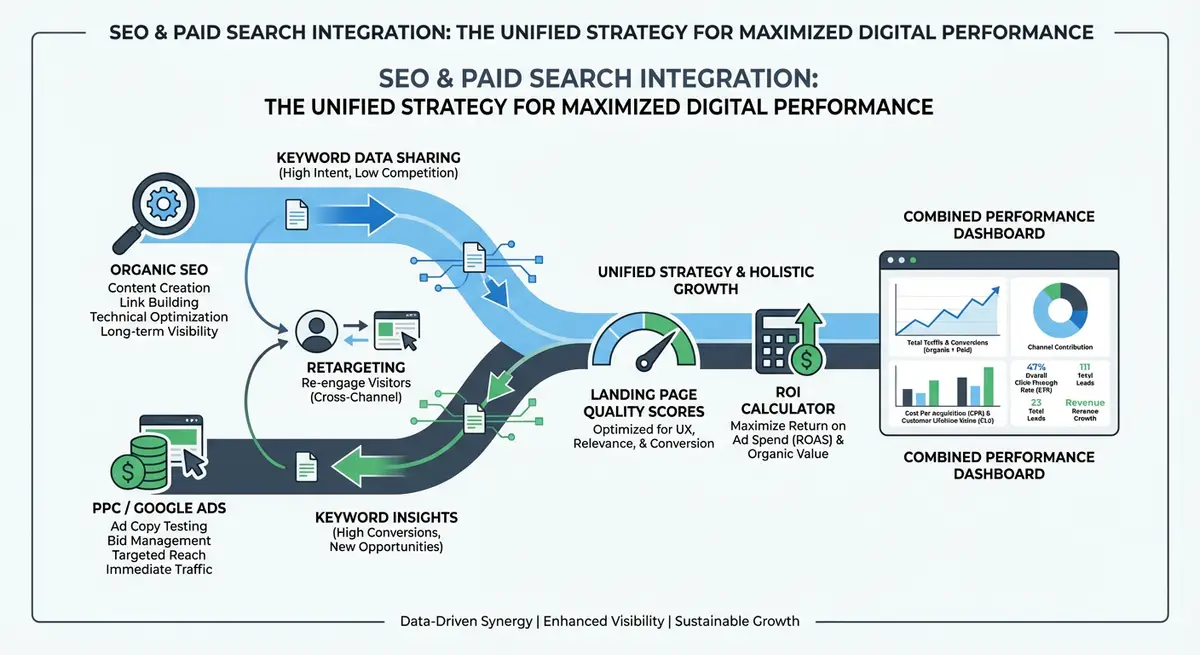
The Attribution Challenge
GA4 uses a data-driven attribution model that distributes conversion credit across multiple touchpoints. A conversion might be attributed 40% to the initial PPC click and 60% to the organic visit that led to the final conversion. Understanding this model prevents you from making the common mistake of crediting only the last click, which typically over-values organic and under-values the PPC touchpoints that initiated the customer relationship.
Setting Up Unified Conversion Tracking
Configure GA4 for unified search marketing measurement
- Link Google Ads to GA4 in the Admin > Product Links section
- Link Google Search Console to GA4 for organic data integration
- Set up conversion events for all business-critical actions: form submissions, phone calls, purchases, bookings
- Enable Google Signals for cross-device tracking
- Configure attribution settings: go to Admin > Attribution Settings and select Data-Driven attribution
- Create a custom channel grouping that separates Branded Paid, Non-Branded Paid, Branded Organic and Non-Branded Organic
Building a Combined Search Marketing Dashboard
Create a unified dashboard that shows both channels side by side with combined metrics. This prevents siloed thinking where PPC and SEO are evaluated independently. The dashboard should include: total search sessions (organic + paid), total search conversions, blended cost per acquisition, individual channel CPA, and total search marketing ROI.
Calculating True Cost Per Acquisition
The true CPA of your search marketing is: (Total SEO investment + Total PPC spend) divided by (Total conversions from organic + paid). This blended CPA is more useful than individual channel CPAs because it reflects the reality that both channels contribute to the conversion journey. As organic traffic grows and PPC spend reduces, the blended CPA should decrease over time.
Avoiding Double-Counting Conversions
- Use GA4 as the single source of truth for conversion counting, not Google Ads conversion tracking separately
- Set conversion counting to "one per session" rather than "every" to avoid inflating conversion numbers
- Import GA4 conversions into Google Ads rather than using separate Google Ads conversion tags
- Regularly audit conversion paths in GA4 to understand how organic and paid interact before conversion
- Exclude internal traffic and test conversions from your reporting
Presenting Integrated Results to Stakeholders
When reporting to clients or leadership, present search marketing as a single investment with a combined return. Show the total investment (SEO fees + PPC spend), total results (all search conversions and revenue), and the trend over time. Highlight how the blended CPA decreases as organic rankings improve and PPC spend shifts from discovery to retargeting.
Complete How-To Guide: Building a Unified SEO and PPC Measurement System
This guide covers configuring GA4 for cross-channel attribution, building a combined dashboard, and creating monthly reports that accurately measure your total search marketing ROI.
How to measure combined SEO and PPC ROI for your Wix business
- Step 1: In GA4, go to Admin then Product Links. Connect your Google Ads account and Google Search Console property. This enables cross-channel data flow in a single analytics platform.
- Step 2: Go to Admin then Data Display then Events. Set up conversion events for every critical business action: form_submit, phone_click, purchase_complete, booking_confirmed. Mark each as a conversion.
- Step 3: Go to Admin then Attribution Settings. Select "Data-driven" as your attribution model. Set the lookback window to 30 days for acquisition events. This ensures conversions are attributed across both channels fairly.
- Step 4: In Google Ads, go to Tools then Measurement then Conversions. Click "Import" and select Google Analytics 4. Import your GA4 conversion events into Google Ads. Remove any duplicate conversion tracking tags.
- Step 5: Create a custom GA4 channel grouping. Go to Admin then Data Display then Channel Groups. Create rules that separate: Branded Paid Search, Non-Branded Paid Search, Branded Organic Search, and Non-Branded Organic Search.
- Step 6: Build a monthly reporting spreadsheet. Create columns for: Month, Organic Sessions, Paid Sessions, Total Search Sessions, Organic Conversions, Paid Conversions, Total Conversions, SEO Cost, PPC Spend, Total Investment, Blended CPA, Search Marketing ROI.
- Step 7: On the first of each month, populate the spreadsheet from GA4 and Google Ads. Calculate Blended CPA as Total Investment divided by Total Conversions. Calculate ROI as (Estimated Revenue minus Total Investment) divided by Total Investment times 100.
- Step 8: In GA4, go to Explore and create a Path Exploration report. Set the starting point as "Session source/medium" filtered to paid search. Look at subsequent touchpoints to see how many paid visitors return via organic before converting.
- Step 9: Create a GA4 Funnel Exploration showing the typical conversion path: First Touch (often PPC) then Content Engagement (often organic) then Conversion. This visualises how both channels contribute to the customer journey.
- Step 10: Build a trend chart showing blended CPA and total conversions month-over-month. The ideal trend is: conversions increasing while blended CPA decreases. This demonstrates the compounding value of integrated search marketing.
- Step 11: Calculate the organic displacement rate: the percentage of PPC keywords where organic rankings now handle the traffic. Show the monthly PPC savings achieved by transitioning keywords from paid to organic.
- Step 12: Present a quarterly search marketing report to stakeholders. Include: total investment, total return, blended CPA trend, channel contribution breakdown, keywords transitioned from paid to organic, and the 90-day forecast. Frame everything as a single search marketing investment, not two competing budgets.
Essential Resources
- Google Analytics 4: Unified attribution modelling and conversion tracking across organic and paid
- Google Looker Studio: Build combined SEO and PPC dashboards for unified ROI reporting
- Google Ads: Import GA4 conversions and track blended CPA across search channels
Was this lesson useful?
It takes 1 minute to tell me. The course is free and I want to keep it that way, and your feedback shows me what is working and helps other people find it.
This lesson on Measuring combined SEO and PPC ROI for Wix businesses is part of Module 29: SEO & Paid Search (SEM) Integration in The Most Comprehensive Complete Wix SEO Course in the World (2026 Edition). Created by Michael Andrews, a Wix Marketplace Legend Partner with 14 years of hands-on experience, 800 completed Wix SEO projects and 456 verified five-star reviews.