How to audit any Wix website from scratch in under 2 hours
Module 52: SEO Audits, Client Work & Going Pro | Lesson 572 of 683 | 65 min read
By Michael Andrews, Wix SEO Expert UK
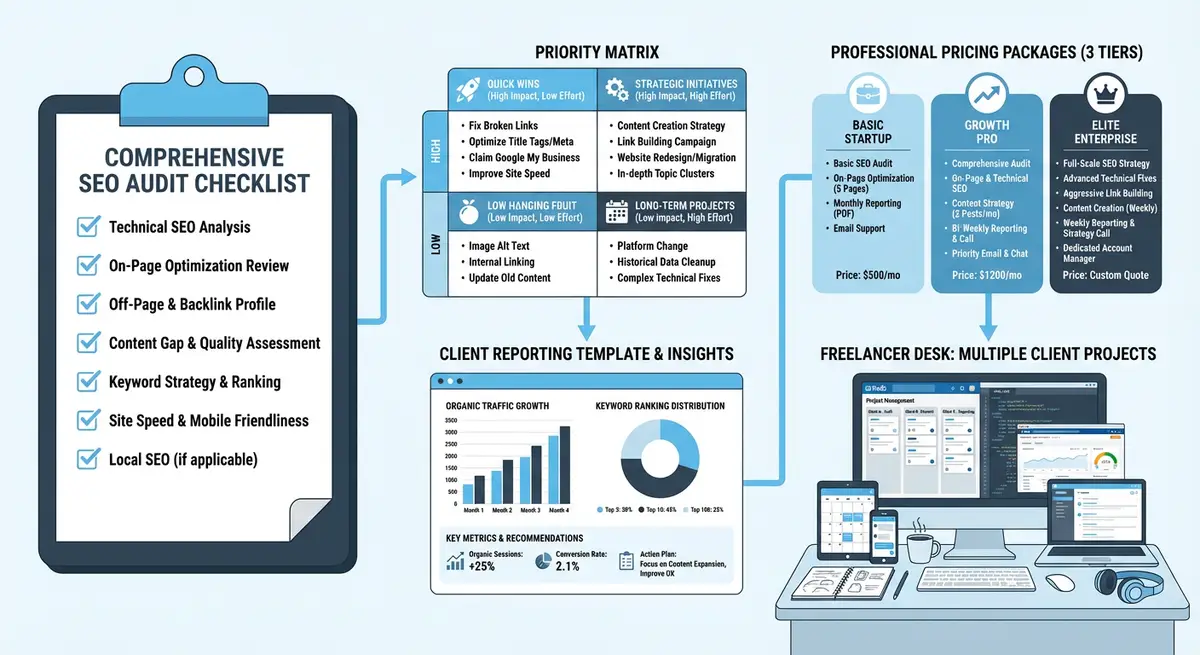
A thorough SEO audit is the foundation of every successful optimisation campaign. Whether you are auditing your own Wix site, a client's site, or a prospect's site to demonstrate your expertise, you need a structured, repeatable process that covers every critical SEO element without wasting time on low-impact checks. This lesson teaches Michael's complete 20-point audit framework that covers technical SEO, on-page optimisation, content quality, off-page authority, and competitive positioning. With practice, you will complete a comprehensive audit in under two hours and produce an actionable report that clearly prioritises what to fix first.
The Audit Mindset: What Separates Good Audits from Great Ones
Most SEO audits fail not because they miss technical issues, but because they lack prioritisation. A 50-page audit that lists every possible issue without ranking them by impact is useless to a client or business owner. Great audits answer three questions: what is broken, how badly does it hurt, and what should we fix first? Your audit must produce a prioritised action plan, not just a list of findings.
- Focus on impact, not completeness: a 20-point audit that prioritises correctly is more valuable than a 200-point audit that treats everything equally.
- Always compare to competitors: findings only matter in context. A page speed score of 65 is not inherently bad if every competitor scores 50.
- Provide solutions, not just problems: every finding should include a specific, actionable recommendation for fixing it.
- Use plain language: if the audit is for a client, avoid jargon. "Your pages take 6 seconds to load, which causes 40% of visitors to leave" is better than "LCP exceeds 2.5s threshold".
- Include quick wins: every audit should identify at least 3-5 changes that can be implemented immediately with meaningful impact.
Pre-Audit Setup: Tools and Access
Before starting the audit, ensure you have access to the necessary tools and data. For client audits, request access to their Google Search Console and GA4. For prospect audits where you do not have access, you can still conduct a thorough external audit using publicly available data and third-party tools.
Essential Audit Tools
- Screaming Frog SEO Spider (free version handles up to 500 URLs): for technical crawl data
- Google Search Console (if you have access): for indexing, performance, and crawl data
- Google PageSpeed Insights: for Core Web Vitals and performance analysis
- Ahrefs or Semrush (free trials available): for backlink analysis and keyword data
- Google Rich Results Test: for structured data validation
- Mobile-Friendly Test or Chrome DevTools: for mobile rendering verification
- Chrome DevTools Lighthouse: for comprehensive performance and accessibility audits
- WAVE or axe DevTools: for accessibility compliance checking
Section 1: Technical SEO Audit (30 Minutes)
The technical audit identifies infrastructure-level issues that affect how search engines crawl, index, and evaluate your site. These issues are often invisible to users but have outsized impact on rankings because they affect every page simultaneously.
Check 1: Crawlability and Indexation
Crawlability verification process
- Run a Screaming Frog crawl of the entire site. Note total URLs discovered, indexable vs non-indexable, and status code distribution.
- Check robots.txt (yourdomain.com/robots.txt): is it blocking important pages or resources? Wix generates robots.txt automatically, but verify it.
- Verify XML sitemap (yourdomain.com/sitemap.xml): does it exist, is it accessible, and does it list all important pages?
- In Search Console (if available): check Pages > Page indexing. How many pages are indexed? How many are excluded and why?
- Use site:yourdomain.com in Google to see approximately how many pages are indexed. Compare to your sitemap URL count.
- Check for accidental noindex tags: filter your crawl data for pages with noindex directives that should be indexed.
Check 2: HTTPS and Security
Security audit checklist
- Verify the entire site loads on HTTPS with no mixed content warnings
- Check that HTTP URLs redirect to HTTPS with 301 status codes
- Verify SSL certificate is valid and not expiring soon
- Check for any insecure resource loading (images, scripts, fonts loaded over HTTP)
- Wix handles SSL automatically, but verify there are no custom code blocks loading insecure resources
Check 3: Site Speed and Core Web Vitals
Performance analysis process
- Test the homepage with Google PageSpeed Insights (both mobile and desktop)
- Test 3-5 key landing pages with PageSpeed Insights
- Record LCP (Largest Contentful Paint), FID/INP (Interaction to Next Paint), and CLS (Cumulative Layout Shift) for each
- Check Search Console Core Web Vitals report for real-user data (CrUX data)
- Identify the specific elements causing poor LCP (usually hero images or large media)
- Check for layout shifts caused by images without dimensions or dynamic content loading
- On Wix: verify images are using Wix image optimisation (not externally hosted unoptimised images)
Check 4: Mobile Usability
Mobile audit checks
- Test the site on a real mobile device (not just browser DevTools)
- Check for text that is too small to read without zooming
- Verify tap targets (buttons, links) are large enough and not too close together
- Check for horizontal scrolling on mobile (indicates layout issues)
- Verify the mobile menu works correctly and all navigation items are accessible
- Test page load speed on a throttled 3G connection to simulate real mobile conditions
- Check Search Console Mobile Usability report for flagged issues
Check 5: URL Structure and Redirects
URL and redirect analysis
- Review URL structure for consistency: are URLs clean, descriptive, and using hyphens?
- Check for redirect chains (A → B → C) which dilute link equity
- Identify any redirect loops (A → B → A) which prevent page access
- Check for 302 (temporary) redirects that should be 301 (permanent)
- Look for orphan pages: pages not linked from any other page on the site
- Verify canonical tags are present and self-referencing on all indexable pages
Check 6: Structured Data
Schema markup audit
- Test the homepage with Google Rich Results Test: is Organization or LocalBusiness schema present?
- Test blog posts: is Article or BlogPosting schema present?
- Test product pages (if applicable): is Product schema present with price, availability, and reviews?
- Test service pages: is Service schema present?
- Check for FAQ schema on pages with FAQ sections
- Check for BreadcrumbList schema for navigation breadcrumbs
- Validate all schema is error-free in the Rich Results Test tool
- Note any rich result opportunities that are not currently being captured
Section 2: On-Page SEO Audit (25 Minutes)
On-page audit examines the SEO elements on individual pages. While you cannot check every page in detail during a 2-hour audit, focus on the top 10-15 pages by traffic and commercial value.
Check 7: Title Tags
Title tag audit process
- Export all title tags from your Screaming Frog crawl
- Check for missing title tags (any page without one)
- Check for duplicate title tags (multiple pages with the same title)
- Check length: titles should be 50-60 characters to avoid truncation in search results
- Verify primary keywords appear early in the title (front-loading)
- Check for keyword stuffing: titles should read naturally, not be a string of keywords
- Verify brand name consistency: is the brand name included and in a consistent position?
Check 8: Meta Descriptions
Meta description audit
- Check for missing meta descriptions (Wix may auto-generate these, but custom is always better)
- Check for duplicate meta descriptions across pages
- Verify length: 150-160 characters to avoid truncation
- Check that each description includes a clear call-to-action or value proposition
- Verify target keywords are included naturally (Google bolds matching terms in search results)
- Check that descriptions accurately reflect the page content (misleading descriptions increase bounce rate)
Check 9: Heading Structure
Heading hierarchy analysis
- Verify every page has exactly one H1 tag (not zero, not two)
- Check that the H1 includes the primary keyword and accurately describes the page content
- Verify heading hierarchy is logical: H1 → H2 → H3 (no skipping levels)
- Check for headings that are used for styling rather than structure (large bold text that is not an actual heading tag)
- Verify sub-headings (H2s, H3s) incorporate secondary and related keywords naturally
- On Wix: check that the visual heading styles in the editor actually correspond to proper heading HTML tags
Check 10: Content Quality Indicators
- Thin content: any important pages with fewer than 300 words that should have more?
- Duplicate content: are there multiple pages targeting the same keyword or covering the same topic?
- Keyword cannibalisation: are multiple pages competing for the same search query?
- Content freshness: when was key content last updated? Is any content outdated or stale?
- E-E-A-T signals: does the content demonstrate Experience, Expertise, Authoritativeness, and Trustworthiness?
- Internal linking: are important pages well-linked from other pages, or are they orphaned?
Check 11: Image Optimisation
Image SEO checklist
- Check for missing alt text on important images (Screaming Frog reports this)
- Verify alt text is descriptive and includes relevant keywords where natural
- Check image file sizes: are any images excessively large (over 500KB)?
- Verify images are using modern formats (WebP) where possible. Wix auto-converts to WebP.
- Check for images with missing width and height attributes (causes CLS layout shifts)
- Verify hero and above-the-fold images are loading quickly (check LCP attribution in PageSpeed)
Section 3: Off-Page and Backlink Audit (15 Minutes)
Check 12: Backlink Profile Overview
Backlink analysis process
- Run the domain through Ahrefs or Semrush to get domain authority/rating and total backlinks
- Note the total referring domains (unique websites linking to the site)
- Check the trend: is the backlink profile growing, stable, or declining?
- Identify the top 10 pages by backlink count: are these the pages you want to rank?
- Check for toxic or spammy backlinks that may be hurting the site (high spam score links)
- Note the anchor text distribution: is it natural or over-optimised with exact-match keywords?
Check 13: Local SEO (If Applicable)
Local SEO audit checks
- Verify Google Business Profile exists, is claimed, and is fully completed
- Check NAP (Name, Address, Phone) consistency across the website and directories
- Verify LocalBusiness schema is present on the homepage or contact page
- Check for local keyword targeting in title tags and content
- Review Google Business Profile reviews: quantity, quality, and response rate
- Check local directory listings: Yelp, industry directories, local chambers of commerce
Check 14: Competitor Benchmarking
Quick competitive analysis
- Identify the top 3 organic competitors for the site's primary keywords
- Compare domain authority/rating across all competitors
- Compare total backlink profiles (referring domains)
- Note any keywords where competitors rank but the audited site does not (content gaps)
- Check competitor content depth: are they publishing more comprehensive content?
- Identify any quick-win keywords where the site ranks position 5-15 (opportunities for easy improvement)
Section 4: Building the Priority Action Plan
The action plan is the most important deliverable of your audit. Raw findings are useless without prioritisation. Use the Impact vs Effort matrix to rank every finding and create a clear roadmap.
The Impact-Effort Prioritisation Matrix
- Priority 1 - High Impact, Low Effort (Quick Wins): fix these first. Examples: adding missing title tags, fixing broken redirects, adding alt text to images, submitting a sitemap.
- Priority 2 - High Impact, High Effort (Strategic Projects): plan these for weeks 2-4. Examples: creating new content for keyword gaps, building backlinks, improving page speed.
- Priority 3 - Low Impact, Low Effort (Easy Maintenance): schedule these for ongoing maintenance. Examples: updating copyright dates, adding social sharing buttons, minor formatting improvements.
- Priority 4 - Low Impact, High Effort (Deprioritise): consider not doing these at all. Examples: redesigning low-traffic pages, pursuing difficult keywords with low commercial value.
The 30-Day Quick Win Plan
Every audit should conclude with a specific list of actions that can be completed in the first 30 days. These quick wins demonstrate immediate value and build momentum for the longer-term strategic work. Aim for 5-10 quick wins that collectively move the needle on organic visibility.
Typical quick wins for Wix sites
- Fix all missing or duplicate title tags identified in the crawl
- Write custom meta descriptions for the top 20 pages
- Add missing alt text to all images on key landing pages
- Fix any broken internal or external links discovered during the audit
- Add structured data (FAQ schema, LocalBusiness schema) where opportunities exist
- Submit an optimised XML sitemap to Google Search Console
- Fix any crawl errors or redirect issues identified in Search Console
- Optimise the 3 most important title tags for better keyword targeting and CTR
- Add internal links from high-authority pages to pages that need ranking boosts
- Compress or replace any oversized images that are hurting page speed
Section 5: E-E-A-T and Content Authority Audit (10 Minutes)
Google increasingly evaluates content through the lens of Experience, Expertise, Authoritativeness, and Trustworthiness. An audit that ignores E-E-A-T misses one of the most significant ranking factors in 2026, especially for YMYL (Your Money, Your Life) topics including health, finance, legal, and safety content.
Check 15: Author and Business Credibility Signals
E-E-A-T verification process
- Check if the site has a clear About page with real names, photos, qualifications, and business history
- Verify author bylines on blog posts. Anonymous content signals lower expertise to Google.
- Check for author bio sections that list credentials, experience, and relevant qualifications
- Look for Organization or Person schema markup that connects content to verified entities
- Verify the business has a verifiable physical address, phone number, and contact information
- Check for trust signals: professional memberships, certifications, awards, press mentions, and industry associations
- Review the Privacy Policy, Terms of Service, and any required regulatory disclosures for completeness
- For YMYL content: verify claims are supported by citations to authoritative sources (government sites, academic papers, industry bodies)
Check 16: Content Freshness and Accuracy
- Identify the most recent update date on key landing pages. Content older than 12 months without updates signals staleness.
- Check for outdated information: old statistics, discontinued products, changed regulations, or expired offers
- Verify any dates mentioned in content are current (e.g., "2024 guide" should now be "2026 guide")
- Check for broken external links that point to moved or deleted pages on other websites
- Evaluate whether the content reflects current industry best practices or is based on outdated methods
- For sites with time-sensitive content: recommend a content refresh schedule (quarterly for guides, monthly for news)
Section 6: JavaScript Rendering and Dynamic Content Audit
Wix sites rely heavily on JavaScript for rendering content. While Google can render JavaScript, there are edge cases where content may not be visible to search engines. This section catches rendering issues that traditional crawls might miss.
Check 17: JavaScript Rendering Verification
Rendering audit process
- Use Google Search Console URL Inspection tool to check the rendered HTML of 5-10 key pages
- Compare the rendered HTML to the page source code. Is all visible content present in the rendered version?
- Check for content that loads only after user interaction (click to expand, tabs, accordions). Google may not trigger these interactions during crawling.
- Verify lazy-loaded images and content below the fold are visible to Google in the rendered version
- If the site uses Wix Velo (custom code), verify that dynamically loaded content appears in the rendered HTML
- Test pages with the mobile rendering view in URL Inspection since Google uses mobile-first indexing
- Check for JavaScript errors in the browser console that might prevent content from rendering
Check 18: Dynamic Page and Repeater Content
- If the Wix site uses dynamic pages connected to collections, verify that Google can access and index each dynamic page URL
- Check that dynamic page SEO settings (title, description, OG tags) are properly configured for each collection item
- Verify dynamic pages appear in the sitemap with their individual URLs
- Test that filtering and sorting on dynamic list pages does not create duplicate content issues
- For sites with member-only content: verify Google is seeing the public version, not a login wall
Section 7: Accessibility and Compliance Audit
Accessibility is both an SEO factor and a legal requirement in many jurisdictions. Google has confirmed that accessibility improvements can positively impact rankings, particularly for mobile usability signals. A quick accessibility check during your SEO audit identifies issues that affect both search visibility and user experience.
Check 19: Core Accessibility Issues
Accessibility spot-check
- Run the WAVE tool or axe DevTools on the homepage and two key landing pages
- Check for missing form labels: every form field must have an associated label element
- Verify sufficient colour contrast between text and background colours (4.5:1 ratio minimum)
- Check that all interactive elements (buttons, links, forms) are keyboard-navigable without a mouse
- Verify ARIA labels are present on interactive elements that lack visible text labels
- Check that the site has a logical heading hierarchy that can be navigated by screen readers
- Verify images have descriptive alt text (overlap with SEO image audit)
- Check for video content: are captions or transcripts available?
Check 20: International and Legal Compliance
- Cookie consent: does the site display a GDPR-compliant cookie consent banner? Are non-essential cookies blocked until consent is given?
- Privacy policy: is it comprehensive, up to date, and easily accessible from every page?
- Accessibility statement: does the site have one, and is it accurate?
- For EU audiences: verify GDPR compliance for data collection forms, analytics, and third-party scripts
- For US audiences: check ADA compliance requirements and any state-specific privacy laws (CCPA for California)
- For eCommerce: verify required legal information is present (returns policy, terms of sale, VAT/tax information)
Section 8: Log File Analysis (Advanced, Optional)
Log file analysis reveals how search engine bots actually crawl your site, as opposed to how you assume they crawl it. While not available for all Wix sites (Wix does not expose raw server logs), if the site uses Cloudflare or a third-party logging solution, this data is invaluable.
- If log data is available: identify which pages Googlebot crawls most frequently (these are your highest-priority pages in Google's view)
- Check for pages that Googlebot never visits: these may have crawl path issues or insufficient internal links
- Look for wasted crawl budget: is Googlebot spending time on low-value pages, old redirects, or error pages?
- Identify crawl frequency trends: is Google crawling more or less frequently over time?
- Check which Googlebot variants are crawling (smartphone vs desktop) to verify mobile-first indexing behaviour
- If log data is not available, use Google Search Console crawl stats as a proxy for crawl behaviour analysis
Presenting the Audit to Clients
How you present audit findings is as important as the findings themselves. A well-presented audit builds trust, demonstrates expertise, and converts prospects into clients. A poorly presented audit overwhelms and confuses, even if the analysis is technically excellent.
- Start with the executive summary: 3-5 key findings and their business impact in plain language.
- Use a scoring system: give the site an overall score (e.g., 45/100) that provides an instant snapshot.
- Include before/after visualisations: show what the site looks like in search results now versus what it could look like after implementing your recommendations.
- Limit findings to the top 15-20 most impactful issues. A 100-finding audit is overwhelming and counterproductive.
- End with the clear action plan: what to do first, second, third, with expected timeline and impact.
- Include competitor comparison data: showing how the site stacks up against competitors creates urgency.
Was this lesson useful?
It takes 1 minute to tell me. The course is free and I want to keep it that way, and your feedback shows me what is working and helps other people find it.
This lesson on How to audit any Wix website from scratch in under 2 hours is part of Module 52: SEO Audits, Client Work & Going Pro in The Most Comprehensive Complete Wix SEO Course in the World (2026 Edition). Created by Michael Andrews, a Wix Marketplace Legend Partner with 14 years of hands-on experience, 800 completed Wix SEO projects and 456 verified five-star reviews.