Google Knowledge Panel: how to claim, verify and optimise your panel
Module 12: Brand SERP Management & Google Feature Domination | Lesson 146 of 683 | 28 min read
By Michael Andrews, Wix SEO Expert UK
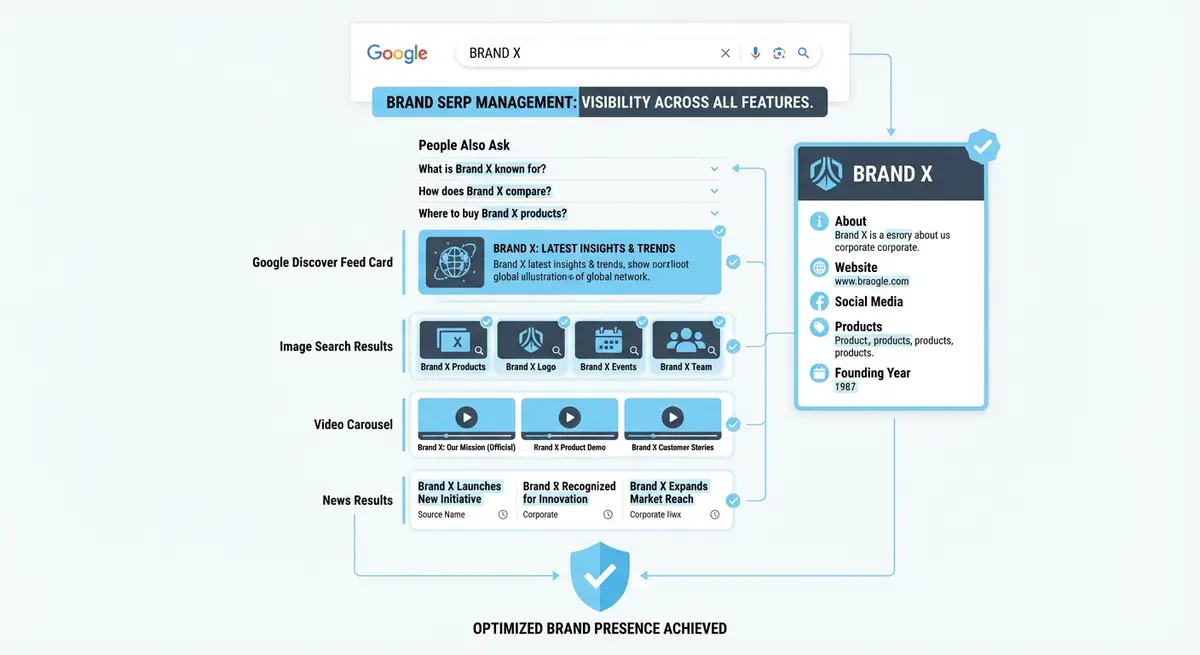
A Google Knowledge Panel is the information box that appears on the right side of search results when Google is confident it understands an entity: a business, person, organisation, or thing. Having a Knowledge Panel for your brand signals that Google recognises you as a legitimate, established entity. It also gives you prime SERP real estate that competitors cannot buy or outrank. This lesson walks you through triggering, claiming, and optimising your Knowledge Panel.
What Triggers a Knowledge Panel
Google Knowledge Panels are generated from the Google Knowledge Graph, a database of entities and their relationships. Google populates this database from authoritative sources including Wikipedia, Wikidata, official websites, Google Business Profile, and trusted third-party databases. A Knowledge Panel appears when Google has gathered enough consistent, corroborated information about an entity to be confident in displaying it.
Not every business gets a Knowledge Panel automatically. Smaller or newer businesses may not have enough corroborating data across the web. The key factors are: consistent NAP data across multiple authoritative sources, a claimed Google Business Profile, presence on Wikipedia or Wikidata, and structured data markup on your website that explicitly defines your entity.
- Google Business Profile is the most common trigger for local business Knowledge Panels
- Wikipedia articles trigger Knowledge Panels for notable organisations and public figures
- Wikidata entries can trigger panels even without a full Wikipedia article
- Consistent structured data across your Wix site reinforces entity recognition
- Media coverage and citations from authoritative sources strengthen entity confidence
Claiming and Verifying Your Knowledge Panel
How to claim your Google Knowledge Panel
- Search your exact brand name on Google and look for the Knowledge Panel on the right side
- If a panel exists, scroll to the bottom and click "Claim this knowledge panel"
- Sign in with a Google account associated with your brand
- Google will ask you to verify ownership through one of your official web presences
- Verification options include: your website via Search Console, your YouTube channel, Twitter/X profile, or Facebook page
- Complete the verification process and wait for Google to confirm (usually 3-7 days)
- Once verified, you can suggest edits to the panel information
Optimising Your Knowledge Panel Information
Once claimed, focus on ensuring the panel displays accurate and comprehensive information. The title should be your exact brand name. The description should accurately reflect what your business does. The logo, website URL, social profiles, and contact information should all be current. If any information is incorrect, submit a suggestion through the claimed panel interface with supporting evidence.
The most effective way to influence your Knowledge Panel content is to ensure consistency across all the sources Google draws from. Update your Google Business Profile, your Wix site structured data, your Wikidata entry, your social profiles, and your directory listings to present identical, accurate information. When Google sees the same data corroborated across five or more authoritative sources, it becomes confident enough to display it.
Using Structured Data to Strengthen Entity Recognition
{
  "@context": "https://schema.org",
  "@type": "Organization",
  "name": "Your Brand Name",
  "url": "https://www.yourdomain.com",
  "logo": "https://www.yourdomain.com/logo.png",
  "sameAs": [
    "https://www.facebook.com/yourbrand",
    "https://www.linkedin.com/company/yourbrand",
    "https://twitter.com/yourbrand",
    "https://www.youtube.com/c/yourbrand",
    "https://www.instagram.com/yourbrand",
    "https://www.wikidata.org/wiki/Q123456789"
  ],
  "foundingDate": "2015-01-01",
  "founder": {
    "@type": "Person",
    "name": "Founder Name"
  },
  "contactPoint": {
    "@type": "ContactPoint",
    "telephone": "+44-20-1234-5678",
    "contactType": "customer service"
  }
}Leveraging Wikidata for Knowledge Panel Generation
Wikidata is a free, open knowledge base that Google actively uses to populate Knowledge Panels. Unlike Wikipedia, Wikidata does not require notability guidelines for entries. Any legitimate business can create a Wikidata entry with basic information: name, description, official website, social media links, founding date, and location. This entry alone can be enough to trigger a Knowledge Panel for your brand.
Creating a Wikidata entry for your brand
- Go to wikidata.org and create a free account
- Click "Create a new item" from the main page
- Enter your brand name as the label and a one-sentence description
- Add properties: official website (P856), social media links, founding date (P571), country (P17)
- Add instance of (P31) as "business" or your specific business type
- Add your logo image if available on Wikimedia Commons
- Save and note the Q-number assigned to your entity for use in structured data
Monitoring and Maintaining Your Knowledge Panel
Knowledge Panels can change without warning as Google reprocesses information from its sources. Check your panel monthly by searching your brand name. If information becomes outdated or incorrect, submit a correction through the claimed panel interface and simultaneously update the source data on your website, Google Business Profile, and Wikidata. Consistency across sources is the fastest way to get corrections accepted.
Knowledge Panel Tools and Resources
- Google Knowledge Panel Help: Official Google documentation on claiming and managing Knowledge Panels
- Wikidata: Create and manage your entity entry in the knowledge base Google uses
- Schema.org Organization: Reference for Organization structured data properties
- Google Structured Data Testing Tool: Validate your structured data implementation
Complete How-To Guide: Triggering and Optimising Your Google Knowledge Panel
This guide covers building the entity signals Google needs to create a Knowledge Panel for your brand, claiming it once it appears, and maintaining accurate information over time.
How to get and optimise a Google Knowledge Panel for your business
- Step 1: Search your brand name in Google to check if you already have a Knowledge Panel. If a panel appears on the right side, skip to Step 7 for claiming. If not, proceed with building entity signals.
- Step 2: Go to wikidata.org and create a free account. Click "Create a new item" and enter your brand name as the label. Write a one-sentence description of your business. This is the most direct way to enter the Google Knowledge Graph.
- Step 3: Add properties to your Wikidata entry: official website (P856), social media links for each platform, founding date (P571), country (P17), instance of (P31) set to your business type. The more properties you add, the stronger the entity signal.
- Step 4: Add comprehensive Organization schema to your Wix homepage. Include: name, url, logo, description, foundingDate, founder (Person type with name), contactPoint, address, and sameAs links pointing to every social profile and your Wikidata entry.
- Step 5: Ensure your business name is consistent across all web properties. Your Wix site, Google Business Profile, social profiles, directory listings, and any press mentions should all use the exact same brand name spelling and formatting.
- Step 6: Build corroborating references. Get your brand mentioned on authoritative websites through press coverage, guest posts, industry directory listings, and local business citations. Google needs to see your entity confirmed by multiple independent sources.
- Step 7: Once a Knowledge Panel appears, scroll to the bottom and click "Claim this knowledge panel". Sign in with a Google account associated with your brand. Select a verification method: Search Console, YouTube, Twitter/X, or Facebook.
- Step 8: Complete verification and wait 3-7 days for Google to confirm. Once verified, you can suggest edits to the panel through the "Suggest an edit" option that appears when you are signed in.
- Step 9: Review every piece of information in your Knowledge Panel. Check the business name, description, logo, website URL, social profiles, hours, and address. For any incorrect information, submit an edit suggestion with supporting evidence.
- Step 10: Upload a high-quality logo through your Google Business Profile if the panel uses a low-quality or incorrect image. The GBP logo is often the primary image source for Knowledge Panels.
- Step 11: Add your Wikidata Q-number to your Organization schema sameAs array. This creates a bidirectional link between your website structured data and the Knowledge Graph entity, strengthening the connection.
- Step 12: Monitor your Knowledge Panel monthly. Check for accuracy, respond to any user-suggested edits that Google may have applied, and update source data across your website, GBP, and Wikidata whenever business information changes.
Was this lesson useful?
It takes 1 minute to tell me. The course is free and I want to keep it that way, and your feedback shows me what is working and helps other people find it.
This lesson on Google Knowledge Panel: how to claim, verify and optimise your panel is part of Module 12: Brand SERP Management & Google Feature Domination in The Most Comprehensive Complete Wix SEO Course in the World (2026 Edition). Created by Michael Andrews, a Wix Marketplace Legend Partner with 14 years of hands-on experience, 800 completed Wix SEO projects and 456 verified five-star reviews.