Building monthly SEO reports that impress (and get results)
Module 15: Wix Analytics & SEO Reporting | Lesson 172 of 683 | 57 min read
By Michael Andrews, Wix SEO Expert UK
A great SEO report does not just list numbers, it tells the story of what happened, why it happened, and what you are doing about it. Clients pay for results and confidence. Your report should deliver both. This lesson covers the complete structure of an effective monthly report, teaches you to build automated dashboards that save hours, and shows you how to present data in a way that retains clients and justifies your fees.
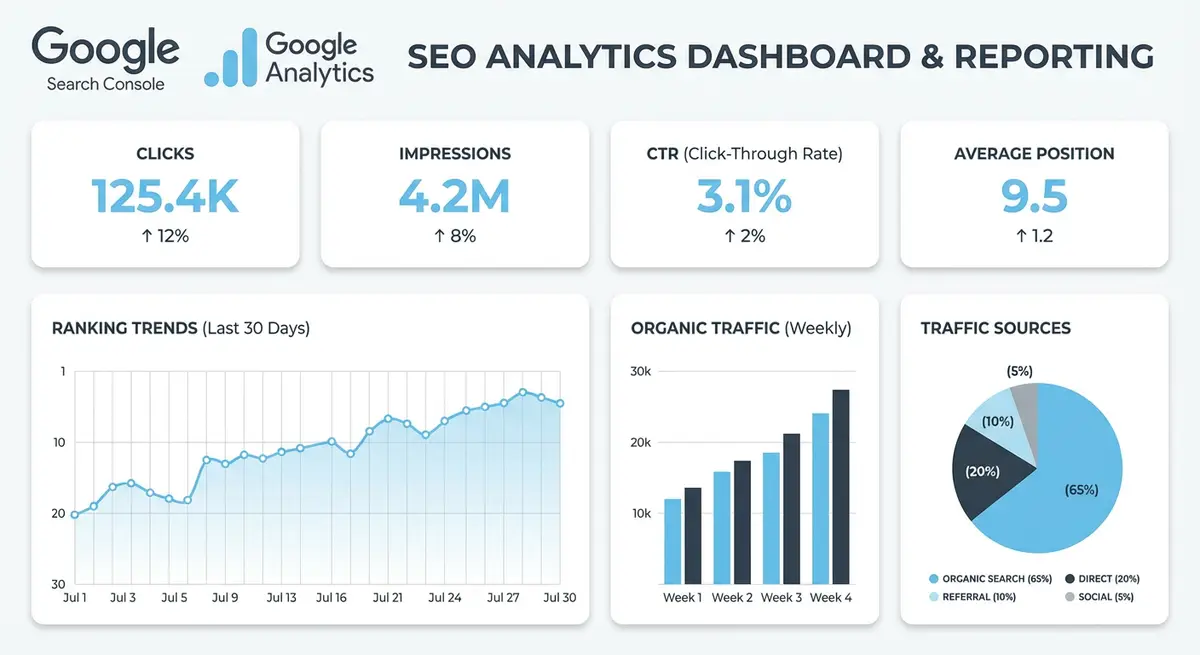
The Structure of an Effective Monthly SEO Report
- 1. Executive Summary: 3-5 bullet points on what happened this month and what it means for the business
- 2. Traffic Overview: organic sessions vs previous month and vs same month last year with trend arrows
- 3. Keyword Rankings: top keywords, position changes, new keywords appearing, keywords entering page one
- 4. Conversions and Goals: leads, form submissions, calls, bookings attributed to organic search
- 5. Technical Health: crawl errors resolved, Core Web Vitals changes, indexing issues fixed
- 6. Work Completed: specific deliverables with quantities and page-level detail
- 7. Next Month Plan: specific actions planned for the next 30 days with expected outcomes
Why Executive Summaries Are the Most Important Section
Most clients will read your executive summary and skim the rest. If they only read one section, the executive summary must stand alone as a complete update. Write it last (after you have collected all the data) but place it first in the report. Use plain language: "Organic traffic increased 23% this month, generating 47 contact form submissions, up from 31 last month. Three new keywords reached page one including your primary target term." This is infinitely more valuable to a client than a table of numbers.
Metrics to Include (and Vanity Metrics to Leave Out)
- Include: organic sessions with month-over-month and year-over-year comparison
- Include: organic conversions broken down by type (forms, calls, bookings, purchases)
- Include: keyword position changes for target terms with clear up/down indicators
- Include: Core Web Vitals scores with pass/fail status and trend direction
- Include: new pages indexed and total index coverage percentage
- Avoid: total impressions without context, clients do not understand why impressions without clicks matter
- Avoid: social media metrics in an SEO report, keep scope clear and focused
- Avoid: rankings for keywords that are not commercially relevant to the client
- Avoid: technical jargon like crawl budget or canonical tags without plain English explanations
- Avoid: data dumps without interpretation, every number should have a so what attached to it
Visualising Data for Maximum Impact
Data visualisation separates professional reports from amateur spreadsheet exports. Use line charts for trends (organic traffic over 12 months), bar charts for comparisons (this month vs last month conversions), and tables for detailed keyword rankings. Colour code everything: green for improvements, red for declines, grey for stable metrics. A client should be able to glance at your report and instantly understand whether things are getting better or worse.
Traffic Trend Charts That Tell Stories
The most impactful chart in any SEO report is a 12-month organic traffic trend line with key events annotated. Mark the dates when you made major changes: "Published 5 new service pages", "Fixed Core Web Vitals", "Earned backlink from industry publication." This connects your work to results visually and demonstrates the cumulative effect of ongoing SEO investment. Without annotations, an upward traffic line looks like luck. With annotations, it looks like strategy.
Handling Bad Months in Your Reports
Every SEO campaign has months where traffic declines. How you report bad months determines whether clients stay or leave. Never hide bad news, clients who discover you glossed over a decline lose trust permanently. Instead, lead with the positive trends first (keywords improving, new content indexed), then address the decline directly with three elements: what happened, why it happened, and what you are doing about it.
- Acknowledge the decline factually: "Organic sessions decreased 12% month-over-month"
- Explain the cause with evidence: "This coincides with Google core algorithm update on March 5th which affected our informational content pages"
- Show the plan: "We are updating the 8 affected pages with expanded content and improved E-E-A-T signals this month"
- Provide context: "Year-over-year organic traffic is still 45% higher than the same period last year"
- Reference industry impact: "SEM sensor data shows 60% of sites in our category were affected by this update"
Using Google Looker Studio for Automated Reports
Looker Studio connects directly to GA4, GSC, and rank tracking tools to create automated, visual dashboards. Once built, the report updates automatically every month, reducing report production from 3 hours to 15 minutes. The free SEO report template from Looker Studio Gallery is a good starting point, but custom dashboards tailored to your client specific KPIs are far more impressive and useful.
Building a Client-Ready Looker Studio Template
A professional Looker Studio report for SEO should have 4-5 pages: Overview (scorecards and headline metrics), Search Performance (keyword data from GSC), On-Site Engagement (GA4 landing page and conversion data), Technical Health (Core Web Vitals and indexing), and Work Summary (text blocks updated monthly). Add your branding, consistent colours, and a date range selector at the top of every page.
Client Retention Through Reporting
Consistent, professional reporting is the number one factor in client retention for SEO services. Clients who receive clear, regular reports showing progress are far less likely to cancel than those who only hear from you when they ask. Even in months where results are flat, a professional report showing the work completed and the plan ahead demonstrates value and keeps the relationship strong.
The Monthly Report Delivery Workflow
- Day 1-2 of month: collect data from GSC, GA4, and rank tracker for the previous month
- Day 2-3: populate your report template with updated data and charts
- Day 3-4: write the executive summary and next month plan sections
- Day 5: internal review for accuracy and clarity before sending
- Day 5-7: send the report with a brief email summary highlighting the top 3 takeaways
- Day 7-10: schedule a 15-minute call to walk through the report if the client wants discussion
How to Build a Reusable Monthly SEO Report Template in Google Slides
How to build a reusable monthly SEO report template in Google Slides
- Step 1: Create a new Google Slides presentation and name it "[Client/Business] SEO Monthly Report Template". Choose a clean, professional theme and set the slide dimensions to widescreen 16:9.
- Step 2: Add a Title Slide as the first slide. Include a placeholder for your logo, a report period field (e.g. "April 2026 SEO Report"), and a prepared-by field with your name or agency name.
- Step 3: Add an Executive Summary slide with three key metrics displayed as large-font numbers: organic sessions for the month, total conversions from organic, and the current ranking position for your top target keyword. Use colour coding: green for improvements, red for declines.
- Step 4: Add a Traffic Trends slide containing a screenshot of the GSC Performance graph for the reporting month. Paste the image directly into the slide and add a text annotation noting the overall click trend (up, down, or stable) compared to the prior period.
- Step 5: Add a Top Keywords slide displaying the top 10 keywords by clicks from the GSC Performance report. Format as a simple two-column table showing keyword and clicks, with position change indicators (up or down arrows) in a third column.
- Step 6: Add a Top Landing Pages slide showing the top 5 pages by organic sessions from GA4. Include the page name, session count, engagement rate, and number of conversions in a clean table format.
- Step 7: Add a Technical Issues slide listing any new GSC errors discovered during the month. For each issue, include the error type, the number of affected pages, and the action taken or planned to resolve it.
- Step 8: Add a Wins This Month slide highlighting ranking improvements and any new page-one positions achieved. Use bullet points with specific before-and-after position data for each keyword that improved.
- Step 9: Add a Next Month Priorities slide listing three to five specific action items for the coming month. Each action item should reference a data insight from the report to demonstrate data-driven planning.
- Step 10: Save the completed presentation as your master template. At the start of each new reporting month, duplicate the file, rename it with the new month and year, and fill in the updated data. Share completed reports with clients or stakeholders using the Google Slides Share button set to "Anyone with the link can view" so they can access without a Google account.
Complete How-To Guide: Creating a Monthly SEO Report for Your Wix Site
This guide walks you through building a complete monthly SEO report from scratch using data from Google Search Console, GA4, and your rank tracking tool.
How to build a professional monthly SEO report for your Wix site
- Step 1: Open Google Search Console and set the date range to the last full calendar month. Compare to the same month in the previous year for seasonal context and to the previous month for trend direction.
- Step 2: Record the four headline metrics: total clicks, total impressions, average CTR and average position. Note the percentage change from both comparison periods and colour code improvements green and declines red.
- Step 3: Export the top 20 keywords by clicks from the Performance report. Include position change data. Highlight any keywords that moved into the top 3, entered page one, or dropped significantly.
- Step 4: Export the top 20 landing pages by clicks from GSC. Note which pages gained or lost traffic compared to the previous period and annotate any pages where you made changes during the month.
- Step 5: Open GA4 and navigate to the Landing Page report filtered to organic traffic. Record total organic sessions, engagement rate, average engagement time, and conversion count for the month.
- Step 6: Identify the top 5 converting organic landing pages. These are the pages delivering actual business value and should be highlighted prominently in your report as proof of SEO ROI.
- Step 7: Check GA4 for any pages with high organic traffic but very low engagement rate (below 30%). Flag these as content improvement opportunities in the Next Month Plan section.
- Step 8: Pull rank tracking data for your target keywords. Create a simple table showing keyword, current position, position last month, change direction, and the URL ranking for each term.
- Step 9: Write the executive summary after collecting all data. Summarise in 3-5 bullet points what happened, why it matters, and what you recommend. Use plain language that a non-technical client would understand.
- Step 10: List the specific SEO work completed this month with quantities. Be concrete: "Optimised 12 product page title tags" is better than "Worked on on-page SEO." Include links or screenshots where helpful.
- Step 11: Add a Next Month Plan section with 3-5 specific, actionable priorities for the coming month. Link these to data insights from the report to demonstrate data-driven decision making.
- Step 12: Create a 12-month traffic trend chart annotated with key milestones and SEO activities. This visual demonstrates the cumulative impact of your work over time.
- Step 13: Review the entire report for accuracy. Check that all dates are correct, calculations add up, and there are no copy-paste errors from previous months. One inaccuracy can undermine the entire report credibility.
- Step 14: Save the report as a template. Next month you only need to update the data and write new summary sections rather than rebuild the structure, reducing production time from hours to 30 minutes.
- Step 15: Send the report with a brief email highlighting the top 3 takeaways and one question or decision that needs client input. This keeps the client engaged and demonstrates that their involvement matters.
Was this lesson useful?
It takes 1 minute to tell me. The course is free and I want to keep it that way, and your feedback shows me what is working and helps other people find it.
This lesson on Building monthly SEO reports that impress (and get results) is part of Module 15: Wix Analytics & SEO Reporting in The Most Comprehensive Complete Wix SEO Course in the World (2026 Edition). Created by Michael Andrews, a Wix Marketplace Legend Partner with 14 years of hands-on experience, 800 completed Wix SEO projects and 456 verified five-star reviews.