Broken link building strategy for Wix websites
Module 10·Lesson 8 of 13·55 min read

Broken link building: replacing dead links with your Wix content

Broken link building is one of the most reliable link-building tactics. You find dead links on other websites, create better content on your Wix site, then ask the webmaster to replace the broken link with yours. This lesson gives you the full process.

What you will learn in this Wix SEO lesson

  • How broken link building works and why it has high success rates
  • Finding broken links on competitor and industry websites
  • Using Ahrefs and Check My Links to identify dead link opportunities
  • Creating replacement content that is genuinely better than the original
  • Outreach templates that convert broken links into backlinks

Broken link building is one of the most reliable and repeatable link building tactics available. The concept is straightforward: you find dead links on other websites, create content on your Wix site that covers the same topic as the original dead resource, then contact the webmaster to suggest your content as a replacement. It works because you are solving a genuine problem for the website owner. Broken links create poor user experience, hurt the linking site's SEO, and reflect badly on their content quality. By alerting them to the broken link and offering a ready-made solution, you transform a cold outreach email into a helpful service. This lesson gives you the complete broken link building process, from finding opportunities at scale to creating replacement content and writing outreach that converts at above-average rates.

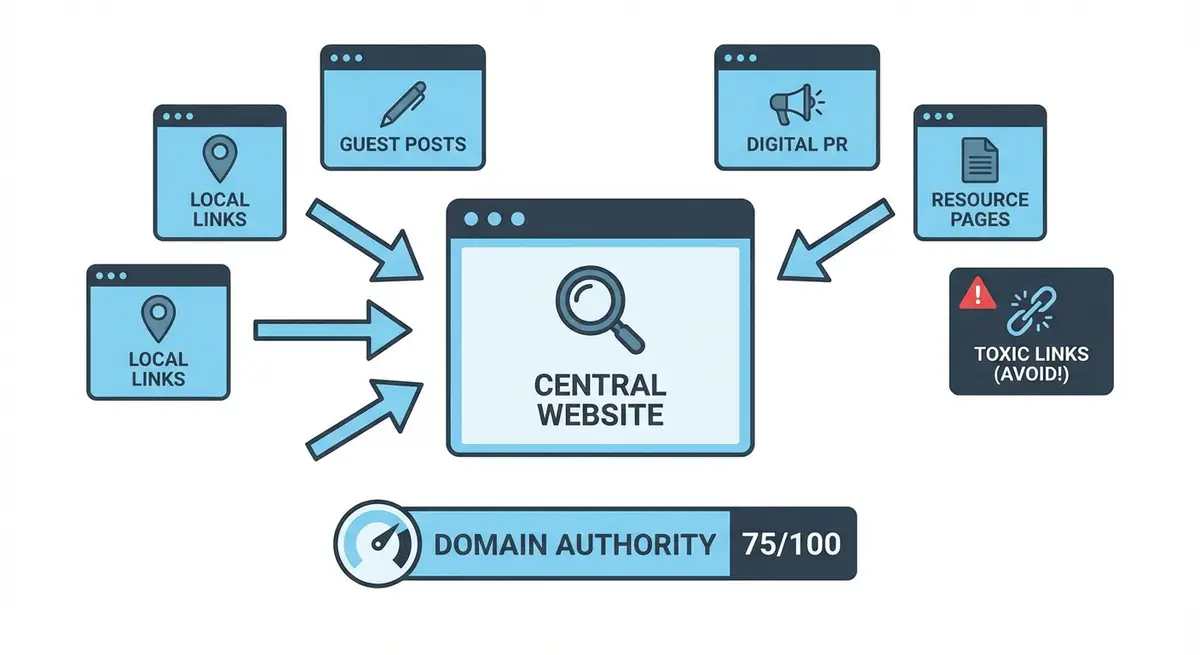
How-to infographic showing link building strategies including guest posting, digital PR, resource pages, local links, and backlink analysis with domain authority metrics
Building high-quality backlinks remains one of the most powerful ways to increase your Wix site authority and rankings.

Why Broken Link Building Has High Success Rates

Most link building outreach asks someone to do something that benefits you with no clear benefit to them. Broken link building reverses this dynamic entirely. You are informing a site owner about a problem on their site (broken links hurt user experience and SEO) and simultaneously offering a solution (your replacement content). This combination of helpfulness and reciprocity is why broken link building consistently outperforms other outreach-based link building methods.

  • You are solving a real problem for the site owner rather than just asking for a favour.
  • The site owner has already demonstrated editorial willingness to link to content on this topic.
  • Your replacement content fills a gap that currently exists on their page.
  • The outreach email is genuinely helpful rather than self-serving.
  • Success rates of 5-15% significantly exceed typical cold outreach rates of 1-3%.

Finding Broken Link Opportunities

Using Browser Extensions

The fastest way to find broken links on individual pages is using a browser extension that scans outbound links and highlights dead ones. These tools work on any webpage and require no technical setup.

Finding broken links with browser extensions

  1. 1Install the Check My Links Chrome extension from the Chrome Web Store.
  2. 2Navigate to a resource page, blog post or article in your niche that contains multiple outbound links.
  3. 3Click the Check My Links icon in your browser toolbar. The extension scans every link on the page.
  4. 4Links highlighted in red are broken (returning 404, 410 or connection errors). These are your opportunities.
  5. 5Right-click each broken link and copy the URL. Record it in your tracking spreadsheet alongside the page URL.
  6. 6Visit 10-20 relevant pages per session to build a substantial list of broken link opportunities.

Using Ahrefs for Broken Link Discovery at Scale

Browser extensions work for individual pages, but Ahrefs enables broken link discovery at scale across entire domains and niches.

Scaling broken link discovery with Ahrefs

  1. 1Enter a competitor domain in Ahrefs Site Explorer and navigate to the Broken Backlinks report.
  2. 2This shows all pages on other sites that link to broken pages on the competitor's domain. These are opportunities because the linking sites are already referencing content in your niche.
  3. 3Filter by Domain Rating of the linking site (aim for DR 20+) to focus on high-value opportunities.
  4. 4Use Ahrefs Content Explorer to search for topics in your niche and filter for pages with broken outbound links.
  5. 5Export the results and add them to your master broken link spreadsheet.

Using the Wayback Machine to Understand Dead Content

When you find a broken link, you need to understand what the original content covered so you can create an appropriate replacement. The Wayback Machine at web.archive.org stores historical snapshots of web pages, letting you see exactly what content existed at any dead URL.

Using the Wayback Machine for broken link research

  1. 1Copy the dead URL and paste it into web.archive.org.
  2. 2Browse the available snapshots to find the most recent version of the content.
  3. 3Note the topic, depth, format and key information the original content covered.
  4. 4Assess whether the content is something you can credibly create a replacement for on your Wix site.
  5. 5Screenshot or save the archived version for reference when creating your replacement content.

Creating Replacement Content

Your replacement content needs to be at least as good as the original dead resource, and ideally significantly better. This is your chance to create something that the site owner will be genuinely happy to link to, increasing both your conversion rate and the long-term value of the placement.

  • Cover the same core topic as the original dead resource but with updated, current information.
  • Add depth that the original lacked. If it was a brief overview, create a comprehensive guide.
  • Include current data, statistics and examples rather than outdated information from the archived version.
  • Format the content professionally with clear headings, images, lists and actionable advice.
  • Ensure the content is genuinely useful as a standalone resource, not a thinly veiled sales page.
  • If the original was a tool or calculator, consider whether you can create a functional equivalent on your Wix site.
  • Host the replacement content at a clean, memorable URL on your Wix site that clearly describes the topic.

Writing Outreach That Converts

The outreach email is the critical conversion point in broken link building. Your email needs to be helpful, specific and easy to act on.

Crafting high-converting broken link outreach

  1. 1Subject line: be direct and helpful. "Broken link on your [page title]" or "Quick heads up about a dead link on your site" work well.
  2. 2Opening: introduce yourself briefly (one sentence) and explain that you found a broken link while reading their content.
  3. 3Identify the problem: provide the exact URL of the page with the broken link and identify which specific link is broken. Make it as easy as possible for them to find and verify the issue.
  4. 4Suggest your replacement: mention that you have a resource covering the same topic and provide the URL. Briefly describe what it covers in one to two sentences.
  5. 5Be genuine: frame it as a suggestion, not a demand. "I thought it might be a useful replacement if you wanted to update the link" is the right tone.
  6. 6Do not over-sell: avoid claiming your content is "amazing" or "the best." Let them evaluate it themselves.
  7. 7Sign off casually: keep it light and low-pressure. "Either way, thought you would want to know about the broken link."

Scaling Your Broken Link Building Campaign

The real power of broken link building comes from systematic execution. A single replacement content piece can be pitched to dozens of sites that linked to the same dead resource.

  • When you find a popular dead URL, search for all sites that link to it using Ahrefs or by searching Google for the dead URL in quotes. Each linking site is a potential outreach target.
  • Create a master spreadsheet tracking every broken link opportunity with the dead URL, linking page, site contact, outreach status and result.
  • Batch your workflow: spend one day finding opportunities, another day creating replacement content, and another day sending outreach.
  • Send outreach in batches of 10-15 per day to maintain personalisation quality.
  • Follow up once after 7 days. The follow-up should reiterate the broken link problem and your suggested replacement.
  • Track conversion rates by niche and site type to identify which opportunities convert best.
  • Build a library of replacement content on your Wix site that can be pitched to multiple sites over time.

Complete How-To Guide: Running a Broken Link Building Campaign

This comprehensive guide walks you through every step of a broken link building campaign, from finding opportunities to creating content and executing outreach at scale.

Follow these steps to run a broken link building campaign for your Wix site

  1. 1Step 1: Install the Check My Links Chrome extension from the Chrome Web Store. This tool scans any webpage and highlights broken outbound links in red.
  2. 2Step 2: Identify 20-30 authoritative websites in your niche that have resource pages, comprehensive blog posts or articles with multiple outbound links. Focus on sites with DA/DR 20+ and genuine readership.
  3. 3Step 3: Visit each target page and run the Check My Links extension. Record every broken link found in a spreadsheet with columns for Page URL, Broken Link URL, Linking Domain DR, Page Topic, Replacement Content Status, Contact Email and Outreach Status.
  4. 4Step 4: For each broken link, copy the dead URL and paste it into the Wayback Machine at web.archive.org. Review the most recent archived version to understand what the original content covered.
  5. 5Step 5: Evaluate whether you can credibly create replacement content for the broken resource. Prioritise opportunities where the topic aligns with your expertise and where multiple sites link to the same dead URL.
  6. 6Step 6: Search Google for the dead URL in quotes to find all other websites that also link to it. Each one is an additional outreach target for the same replacement content, dramatically increasing your ROI on content creation.
  7. 7Step 7: Create comprehensive replacement content on your Wix site that covers the same topic as the dead resource with updated information, better formatting and greater depth. Host it at a clean, descriptive URL.
  8. 8Step 8: Ensure your replacement content is genuinely better than the archived original by adding current data, practical examples, visual aids and more actionable detail.
  9. 9Step 9: Find the contact email for the webmaster or content manager of each target site. Use the About page, Contact page or Hunter.io to find the right contact.
  10. 10Step 10: Write a personalised outreach email for each target. Identify the specific page and broken link, suggest your replacement content, and provide the direct URL. Frame the email as a helpful notification, not a link request.
  11. 11Step 11: Send outreach in batches of 10-15 per day. Track every email in your spreadsheet with the date sent, contact used and response status.
  12. 12Step 12: Follow up after 7 business days with anyone who has not responded. Reiterate the broken link issue and mention that fixing it improves their user experience and SEO.
  13. 13Step 13: For successful responses, verify the new backlink is live, correctly pointing to your Wix page, and using appropriate anchor text. Send a thank-you email to maintain the relationship.
  14. 14Step 14: Monitor your new backlinks in Google Search Console under the Links report. Track keyword ranking improvements on your linked pages over 8-12 weeks. Calculate your campaign ROI based on links earned per hour invested.

Final Checkpoint

After running your campaign for 4-6 weeks you should have a library of replacement content on your Wix site, outreach sent to at least 50 targets, 5-10 new backlinks from quality sites, and clear data on your conversion rates. The beauty of broken link building is that it is infinitely repeatable. New links break every day, creating a perpetual stream of opportunities.

Finished this lesson?

Mark it complete to track your course progress.

AI Lesson Tutor

AI Powered

Got a question about this lesson? Ask the AI tutor for a quick explanation or practical examples.

Your Course Resources

11 downloadable PDFs -- checklists, templates, worksheets and your certificate

Course Progress0/561 lessons

Checklists

Wix SEO Audit ChecklistPDF

20-point site-wide audit covering technical, on-page, content and local SEO

On-Page SEO ChecklistPDF

37-point per-page checklist: titles, headings, content, images, links, schema

Technical SEO Deep-DivePDF

50-point technical audit: crawlability, Core Web Vitals, speed, security, Wix-specific

Local SEO Setup ChecklistPDF

42-point local checklist: Google Business Profile, NAP, citations, reviews, local links

Site Launch SEO ChecklistPDF

48-point pre-launch and post-launch guide for new Wix sites going live

Templates & Worksheets

Keyword Research TemplatePDF

Printable tracker with columns for volume, difficulty, intent, priority and notes

Monthly SEO Report TemplatePDF

Client-ready report covering traffic, rankings, technical health and action plan

Content Brief TemplatePDF

Plan every page: target keywords, outline, competitor analysis, internal links, CTAs

Backlink Outreach TrackerPDF

Campaign log with status tracking plus 3 proven outreach email templates

Competitor Analysis WorksheetPDF

14-metric comparison table, content gap analysis and SEO SWOT framework

Achievement

Certificate of CompletionLocked

Complete all lessons to unlock (0/561 done)

Lesson Tools

No part of this Wix SEO Course content may be reproduced, copied, or distributed without the written consent of Michael Andrews.

This lesson on Broken link building: replacing dead links with your Wix content is part of Module 10: Link Building & Off-Page SEO in The Most Comprehensive Complete Wix SEO Course in the World (2026 Edition). It covers Wix SEO optimization (US) and optimisation (UK) strategies applicable to businesses in the United Kingdom, United States, Australia, Canada, New Zealand, Ireland and worldwide. Created by Michael Andrews, the UK's No.1 Wix SEO Expert with 14 years of hands-on experience, 750+ completed Wix SEO projects and 425+ verified five-star reviews. This is lesson 114 of 561 in the most affordable, most comprehensive Wix SEO training programme available in 2026.