Brand SERP management: controlling what Google shows for your business name
Module 12: Brand SERP Management & Google Feature Domination | Lesson 145 of 683 | 30 min read
By Michael Andrews, Wix SEO Expert UK
When someone searches your brand name on Google, the results page they see is your Brand SERP. It functions as your digital business card, your first impression, and often the deciding factor in whether a potential customer chooses you or moves on. Yet most Wix site owners have never deliberately audited or optimised what appears when people Google their business name. This lesson teaches you how to take control of every result on that page.
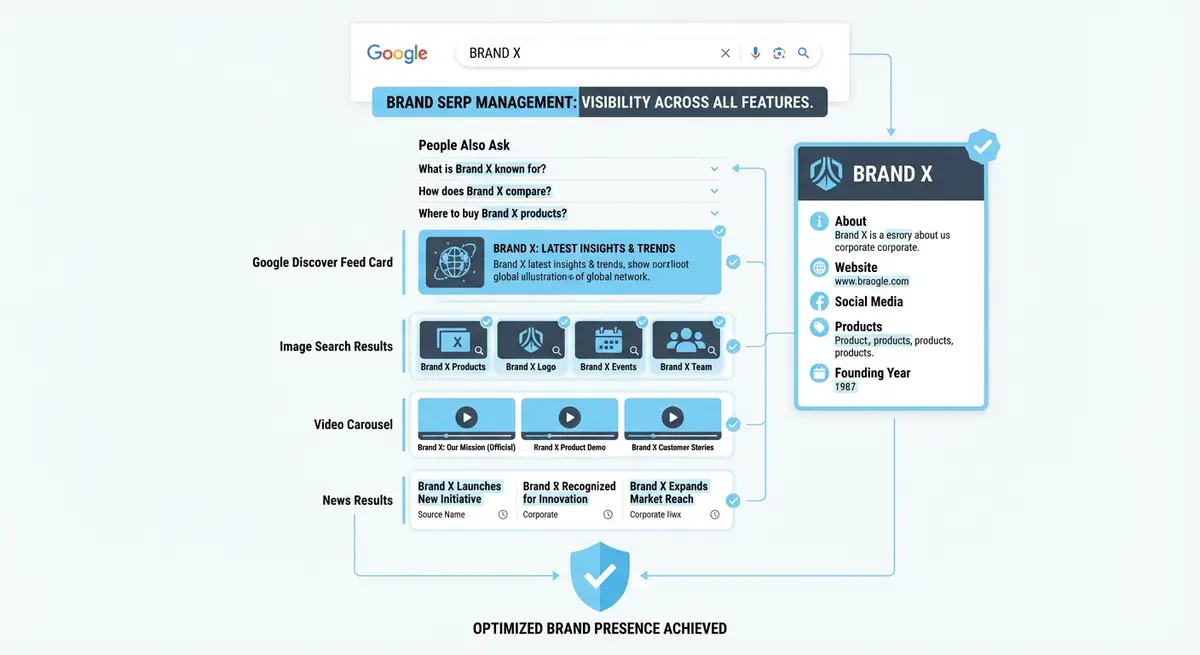
What Is a Brand SERP and Why It Matters
A Brand SERP is the search engine results page that appears when someone types your exact business name into Google. Unlike competitive keyword SERPs where you are fighting hundreds of competitors, your Brand SERP is territory you should own entirely. If you cannot dominate the results for your own name, you have a serious brand authority problem that undermines every other SEO effort you make.
Research consistently shows that 65% of people who search a brand name are in the consideration phase of a purchase decision. They have already heard of you through a referral, an ad, or organic discovery, and they are now doing due diligence. What they find on your Brand SERP directly influences conversion. Negative reviews, outdated directory listings, or competitor ads appearing for your name can derail the sale before it starts.
How to Audit Your Current Brand SERP
Perform a thorough Brand SERP audit using these steps
- Open an incognito or private browser window to avoid personalised results
- Search your exact business name and screenshot the entire first page of results
- Search your business name plus your city or region and screenshot those results
- Search your business name plus "reviews" and note what appears
- Create a spreadsheet listing every result: position, URL, page title, and whether you control it
- Categorise each result as Owned (your site), Earned (positive mentions), Neutral (directories), or Negative (complaints, competitors)
- Identify gaps where competitors, outdated listings, or irrelevant results appear
Optimising Your Wix Site for Brand Name Queries
Your Wix homepage should be the undisputed number one result for your brand name. Ensure your homepage title tag begins with your exact brand name, followed by a concise descriptor. Your meta description should include your brand name, your primary service, and your location if you serve a specific area. The homepage H1 should also contain your brand name naturally.
Beyond the homepage, your About page, Contact page, and primary service pages should all include your brand name in their title tags and content. Google typically shows sitelinks (indented sub-pages) beneath your main result when it is confident about your site structure. Clear navigation labels and a logical hierarchy on your Wix site encourage sitelinks to appear, giving you more visual real estate on the SERP.
Managing Social and Directory Results
- Claim and fully complete your Google Business Profile with photos, posts, and accurate NAP information
- Optimise your LinkedIn company page with your brand name in the headline and a keyword-rich description
- Ensure your Facebook business page is active and has your brand name as the page title
- Claim profiles on industry-specific directories like Yell, Trustpilot, and Bark
- Create or claim your Crunchbase profile if you are a technology or startup business
- Register consistent profiles on YouTube, Instagram, Pinterest, and Twitter/X using your exact brand name
Pushing Down Negative or Unwanted Results
If a negative review, outdated listing, or competitor result appears on page one for your brand name, you cannot simply remove it from Google. Instead, you displace it by strengthening the results you control. Every slot on page one that you fill with a property you own is a slot that negative content cannot occupy. This is a long-term strategy that requires consistent effort across multiple platforms.
Displacement strategy for unwanted Brand SERP results
- Identify which owned properties are not yet ranking on page one for your brand name
- Fully optimise each profile: complete every field, add images, include your brand name prominently
- Build links to your social profiles from your Wix site footer and About page
- Publish regular content on platforms like LinkedIn, Medium, or YouTube to boost their authority
- Create a press page on your Wix site linking to media mentions and guest posts
- Monitor weekly and track which results are rising and which are being displaced
Brand SERP Monitoring and Maintenance
Your Brand SERP is not static. New reviews, directory listings, news articles, and social posts can shift the results at any time. Set up a Google Alert for your exact brand name in quotes to receive email notifications whenever Google indexes new content mentioning your business. Check your Brand SERP manually at least once per month using incognito mode, and document any changes in your tracking spreadsheet.
Brand SERP Management Tools
- Google Alerts: Monitor new mentions of your brand name across the web
- BrightLocal: Check Brand SERPs from multiple locations and track local rankings
- Brand24: Real-time brand mention monitoring across social media and the web
- Semrush Brand Monitoring: Track brand mentions, sentiment, and SERP positions over time
Complete How-To Guide: Taking Control of Your Brand SERP
This guide walks through auditing your current Brand SERP, claiming every available profile, and building a displacement strategy to push down unwanted results.
How to dominate the search results for your brand name
- Step 1: Open an incognito browser window and search your exact business name. Screenshot the entire first page. Create a spreadsheet with columns: Position, URL, Title, Owned/Earned/Neutral/Negative.
- Step 2: Repeat the search with variations: "[brand name] reviews", "[brand name] [city]", "[brand name] scam". Document results for each variation. These secondary Brand SERPs reveal vulnerabilities you may not see on the primary search.
- Step 3: Ensure your Wix homepage is optimised for your brand name. Your title tag should start with your exact brand name. Your H1 should contain it. Your meta description should mention it with your primary service and location.
- Step 4: Claim and fully complete your Google Business Profile. Fill in every field: business description (750 characters), services, products, hours, photos (minimum 10), and attributes. Post weekly updates.
- Step 5: Claim profiles on all major social platforms using your exact brand name: LinkedIn Company Page, Facebook Business Page, Twitter/X, Instagram, YouTube, Pinterest. Complete every profile field and add your website link.
- Step 6: Register on industry-specific directories: Trustpilot, Yell, Bark, Clutch, or whichever directories rank for your industry. Ensure your business name, address, and website are consistent across every listing.
- Step 7: Create a Wikidata entry for your business. Go to wikidata.org, create an item with your brand name, add your website URL, social profiles, founding date, and business type. This feeds into Google's Knowledge Graph.
- Step 8: Add Organization schema to your Wix homepage with your brand name, URL, logo, and sameAs links pointing to every social profile and directory listing. This connects all your properties into a single recognised entity.
- Step 9: Publish content on external platforms that rank well: write a LinkedIn article about your expertise, publish a Medium post, create a YouTube video introducing your business. Each becomes a potential page-one result for your brand name.
- Step 10: Build links to your social profiles and directory listings from your Wix site footer, About page, and Contact page. These links pass authority to those profiles, helping them rank higher for your brand name.
- Step 11: If negative results appear, do not try to suppress them. Respond professionally on the platform where they exist. Then strengthen every property you control to displace the negative result from page one. Each new optimised property you add pushes the negative result further down.
- Step 12: Set up ongoing monitoring. Create a Google Alert for your exact brand name in quotes. Check your Brand SERP manually once per month in incognito mode. Update your tracking spreadsheet and note any position changes.
Was this lesson useful?
It takes 1 minute to tell me. The course is free and I want to keep it that way, and your feedback shows me what is working and helps other people find it.
This lesson on Brand SERP management: controlling what Google shows for your business name is part of Module 12: Brand SERP Management & Google Feature Domination in The Most Comprehensive Complete Wix SEO Course in the World (2026 Edition). Created by Michael Andrews, a Wix Marketplace Legend Partner with 14 years of hands-on experience, 800 completed Wix SEO projects and 456 verified five-star reviews.