Alt text, ARIA labels and semantic HTML on Wix
Module 13: Accessibility & SEO on Wix | Lesson 157 of 683 | 28 min read
By Michael Andrews, Wix SEO Expert UK
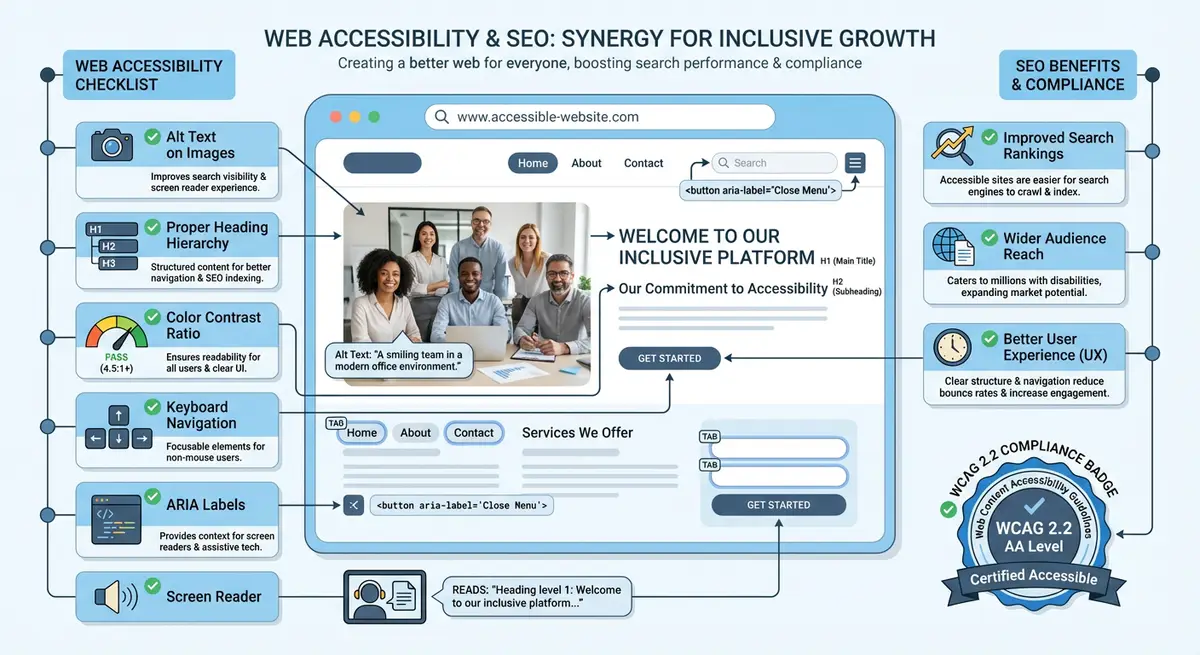
Three accessibility fundamentals have the biggest overlap with SEO: alt text on images, ARIA labels on interactive elements, and semantic HTML structure. Getting these right on Wix requires knowing where the settings are, because Wix sometimes hides them in non-obvious places.
Writing Alt Text That Serves Both SEO and Accessibility
Good alt text describes what the image shows in a way that is useful to someone who cannot see it. It should also naturally include relevant keywords where appropriate, without keyword stuffing. A product image of red running shoes should have alt text like "Red Nike Air Zoom running shoes on white background" not "running shoes buy cheap running shoes Nike shoes".
Alt text best practices for Wix
- Click any image in the Wix editor and look for the alt text field in the image settings
- Write a description of what the image shows in 10-15 words
- Include your target keyword naturally if the image is relevant to that keyword
- For decorative images (borders, backgrounds), set alt to empty (Wix allows this)
- For complex images like infographics, provide a longer description or link to a text alternative
ARIA Labels on Wix
ARIA (Accessible Rich Internet Applications) labels provide names and descriptions for interactive elements that do not have visible text labels. On Wix, buttons with only icons, search bars, navigation menus and social media icon links often need ARIA labels. Without them, screen readers announce these elements as "button" or "link" with no context.
Semantic HTML on Wix
Wix generates HTML automatically, and you have limited control over the semantic elements used. However, you can influence semantics through heading levels (set in text settings, not by visual size), link text (descriptive rather than generic), and proper use of the Wix text element types (paragraph, heading, list) rather than styled text boxes.
Complete How-To Guide
This step-by-step guide walks you through systematically auditing and fixing all alt text, ARIA labels and semantic HTML issues across your entire Wix site, ensuring both screen reader users and search engines can fully understand your content.
How to fix alt text, ARIA labels and semantic HTML on your Wix site
- Step 1: Open your Wix site in Chrome and run the WAVE accessibility checker. Click the "Details" tab and filter results to show only "Missing alternative text" and "Linked image missing alternative text" errors. Count the total number of images that need attention.
- Step 2: Open your Wix Editor and navigate to the first page. Click on the first image on the page. In the image settings panel (gear icon or right-click > Settings), locate the "What's in the image? (Alt Text)" field. If this field is empty, you need to add alt text.
- Step 3: For each content image, write alt text that answers the question "What does this image show?" in 10-15 words. Include your page's target keyword naturally if the image is relevant. Example: for a photo of a hairdresser cutting hair on a salon services page, write "Professional hairdresser cutting client hair in modern salon chair" rather than just "haircut" or "salon services haircut hairdresser best haircuts London".
- Step 4: For decorative images (background patterns, dividers, purely aesthetic elements), set the alt text to empty by checking the "Mark as decorative" option in Wix, or leaving the alt text field deliberately blank. This tells screen readers to skip the image entirely, which is the correct behaviour for non-informative images.
- Step 5: For complex images such as charts, infographics or diagrams, the alt text alone is not sufficient. Write a brief alt text describing what the image is (e.g. "Bar chart showing monthly website traffic growth"), then add a detailed text description below the image on the page itself, or link to a separate page with the full data.
- Step 6: Now audit ARIA labels. In your published Wix site, right-click on any icon-only button (such as a hamburger menu, social media icon, or search icon) and choose Inspect. In the Elements panel, check whether the element has an aria-label attribute. If it shows only "button" or "link" with no descriptive label, it needs fixing.
- Step 7: To add ARIA labels in the Wix Editor, right-click the element and select "Accessibility" from the context menu. In the accessibility panel, enter a descriptive label in the "Label" field. For a search icon button, enter "Search this site". For a Facebook icon link, enter "Visit our Facebook page". For a hamburger menu button, enter "Open navigation menu".
- Step 8: Audit your navigation menu for ARIA landmarks. Run axe DevTools and check for "landmark" related issues. Your Wix site should have the main navigation wrapped in a nav landmark. Wix typically handles this automatically, but verify by inspecting the HTML. If using multiple navigation areas (header nav, footer nav), ensure each has a distinct aria-label like "Main navigation" and "Footer navigation".
- Step 9: Review your heading structure on every page. Use the WAVE tool's "Structure" tab or the HeadingsMap browser extension to visualise the heading hierarchy. Every page must have exactly one H1 (your page title), followed by H2s for major sections, and H3s for subsections. Never skip levels (e.g. jumping from H1 to H3).
- Step 10: In the Wix Editor, fix heading levels by selecting text and changing its type in the text formatting toolbar. Important: set the heading level using the heading type dropdown (Heading 1, Heading 2, etc.), not by manually changing the font size. Visual size and semantic heading level must be set separately in Wix.
- Step 11: Audit all links on your site for descriptive link text. Search for any links that say "Click here", "Read more", "Learn more" or "Link". Replace these with descriptive text that explains where the link goes, such as "Read our complete guide to Wix SEO" or "View our pricing plans". This helps both screen reader users and Google understand your link structure.
- Step 12: Check that your Wix site's HTML language attribute is set correctly. Go to Wix Dashboard > Settings > SEO > scroll to the language setting. Ensure it matches your site's primary language (e.g. "en" for English). This tells screen readers which pronunciation rules to use and helps Google serve your content to the right audience.
- Step 13: After making all fixes, re-run WAVE, axe DevTools and a screen reader test on every updated page. Verify that all "Missing alternative text" errors are resolved, all interactive elements announce their purpose correctly, and the heading structure is logical on every page. Document any remaining issues that cannot be fixed within Wix's editor limitations.
Essential Resources
- WAVE Web Accessibility Tool: Detect missing alt text and ARIA label issues on your Wix pages
- axe DevTools: Identify ARIA and semantic HTML violations with detailed remediation guidance
- HeadingsMap Extension: Visualise heading hierarchy structure on any web page
- SEO Fix in a Box: My Wix app. Free to install, it scans your site and shows what needs fixing, and paid plans write the fixes from your own Google searches
Was this lesson useful?
It takes 1 minute to tell me. The course is free and I want to keep it that way, and your feedback shows me what is working and helps other people find it.
This lesson on Alt text, ARIA labels and semantic HTML on Wix is part of Module 13: Accessibility & SEO on Wix in The Most Comprehensive Complete Wix SEO Course in the World (2026 Edition). Created by Michael Andrews, a Wix Marketplace Legend Partner with 14 years of hands-on experience, 800 completed Wix SEO projects and 456 verified five-star reviews.